IBM Z Mainframe Monitoring
Mainframe monitoring with XorMon covers IBM Z (z12 and newer) and IBM LinuxONE at the hardware and hypervisor level. XorMon, open source under GPL v3, reads the REST API of the HMC and graphs server CPU (total, shared and dedicated), LPAR CPU, z/VM paging, processor types, channels and power.
What does mainframe monitoring cover in XorMon?
XorMon monitors IBM Z mainframes and IBM LinuxONE through the HMC, at the hardware and hypervisor level: the server, its LPARs, processors, channels, power and configuration.
The Hypervisor monitoring page lists PR/SM from IBM as the bare-metal hypervisor of the Z Mainframe, with the HMC as the XorMon data source. IBM Z Mainframe was added to the supported technologies in XorMon v1.8.0, and v2.0.0 added IBM Z Mainframe and IBM LinuxONE in DPM mode.
Sources: Hypervisor monitoring, updated 2026-10-06, Release 1.8.0 and Release 2.0.0.
Which key metrics does XorMon collect on IBM Z and LinuxONE?
For the server, XorMon graphs CPU total, CPU shared and CPU dedicated; for LPARs, CPU, z/VM paging, CP, IFL, ICF and IIP; for processors, CP, IFP and SAP. Channels and power are also monitored.
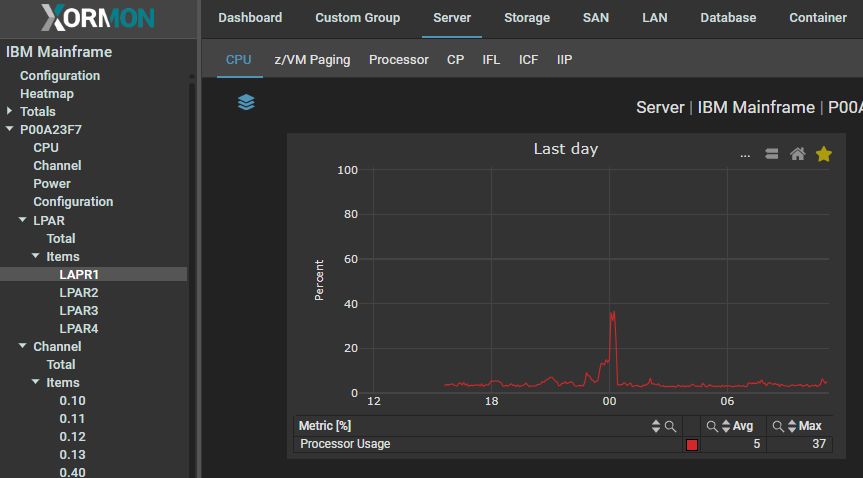
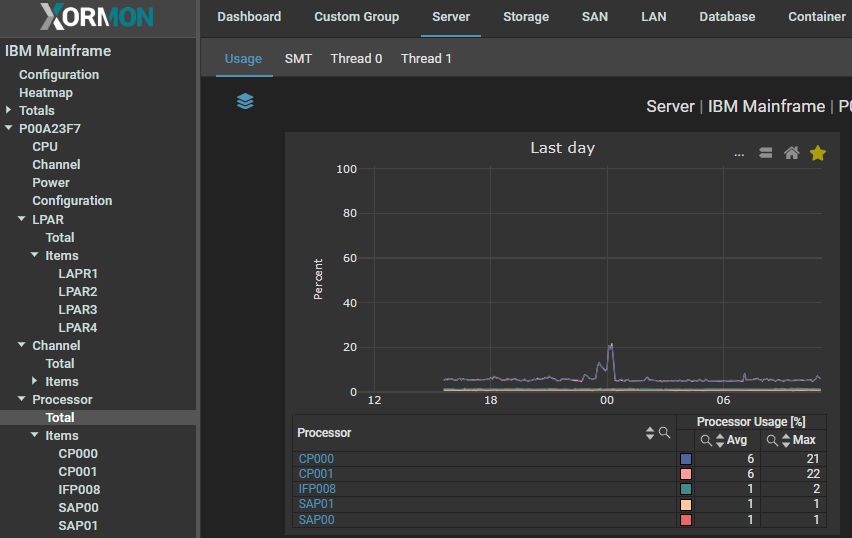
The feature matrix groups these metrics by subsystem (Server, LPAR, Processor, Channel and Power) and marks each one for both Z Mainframe and LinuxONE. The documentation page shows example graphs for Server CPU Total, LPAR CPU, Processor CPU and Channel, and its resource list also includes Configuration. More examples are on the demo site.
Source: Feature matrix.
How does XorMon collect data from the IBM Z HMC?
XorMon reads the REST API natively provided by the IBM Z Mainframe or IBM LinuxONE HMC, over HTTPS on port 6794, with a read-only user.
On the HMC, create the user xormon with the required roles and enable the Web Services API if it is not done yet. In XorMon, add the HMC under Settings, Device, Server virtualization, IBM Z Mainframe, then run Test on the configured device: it must show OK. The access summary of the XorMon deployment page lists the HMC as data source, the HMC REST API as interface and a read-only user role.
Sources: IBM Z Mainframe setup, updated 2026-05-04, and XorMon deployment.
How does XorMon alert on and export mainframe data?
Alerts can be set on any metric the tool collects, for all configured devices, and the public API lists virtualization_mainframe among its CMDB types.
Performance alerts are configured under Settings, Alerting, Performance, with a threshold and email groups defined in advance, and email alerts include graphs by default. XorMon prediction alerting warns when a metric is predicted to reach its threshold within a set number of days. Exclude hours stop threshold evaluation during predictable workload such as maintenance windows or batch processing, while quiet hours only hold back notifications. Alerts go out by email, SNMP trap, ServiceNow, Zabbix, Discord or Telegram. Tables of a CMDB type are exported in CSV through the public API, with an apiKey header.
Sources: Alerting, updated 2026-10-13, Alerting integrations, updated 2026-10-22, and CMDB CSV export, updated 2026-05-04.
Key points
- Monitors IBM Z mainframes (z12 and newer) and IBM LinuxONE through the HMC REST API.
- Covers the hardware and hypervisor level: server, LPARs, processors, channels, power and configuration.
- Graphs server CPU total, shared and dedicated, LPAR CPU with z/VM paging and CP, IFL, ICF and IIP, and CP, IFP and SAP processors.
- Connects to the HMC on port 6794 with a read-only user and the Web Services API enabled.
- Alerts on any collected metric, free open source license (GPL v3).
IBM Z Mainframe monitoring resources and examples
The product uses REST API natively provided by the IBM Z Mainframe / IBM LinuxONE HMC to get all necessary data.Supported are IBM Z Mainframes z12 and newer.
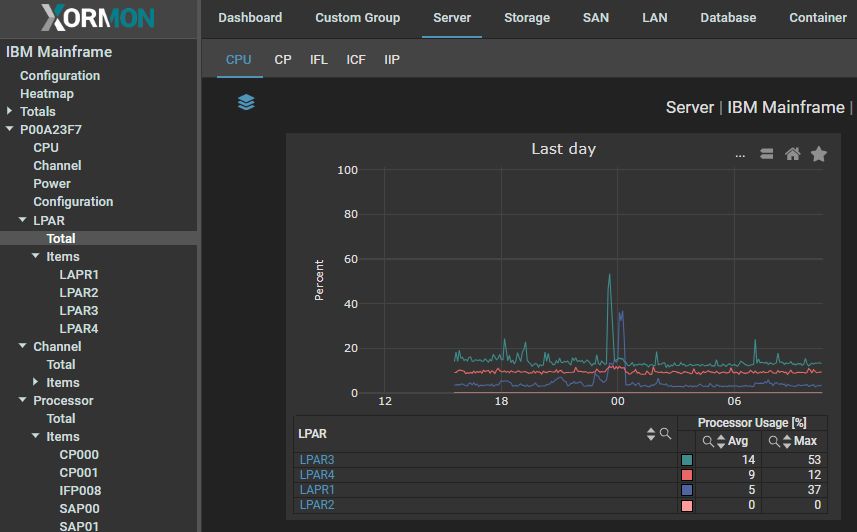
Monitoring Resources
- Server
- CPU total
- CPU Shared
- CPU Dedicated
- LPAR
- CPU
- z/VM paging
- CP
- IFL
- ICF
- IIP
- Channel
- Power
- Processor
- CP
- IFP
- SAP
- Configuration
Examples
Server CPU Total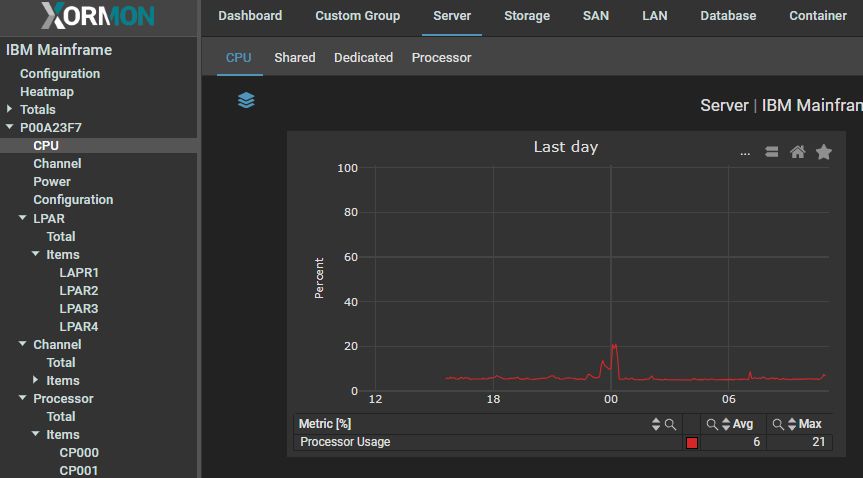
LPAR CPU
Processor CPU
Channel

More examples on our free demo site.
Last updated: