Flow monitoring — NetFlow, IPFIX, sFlow
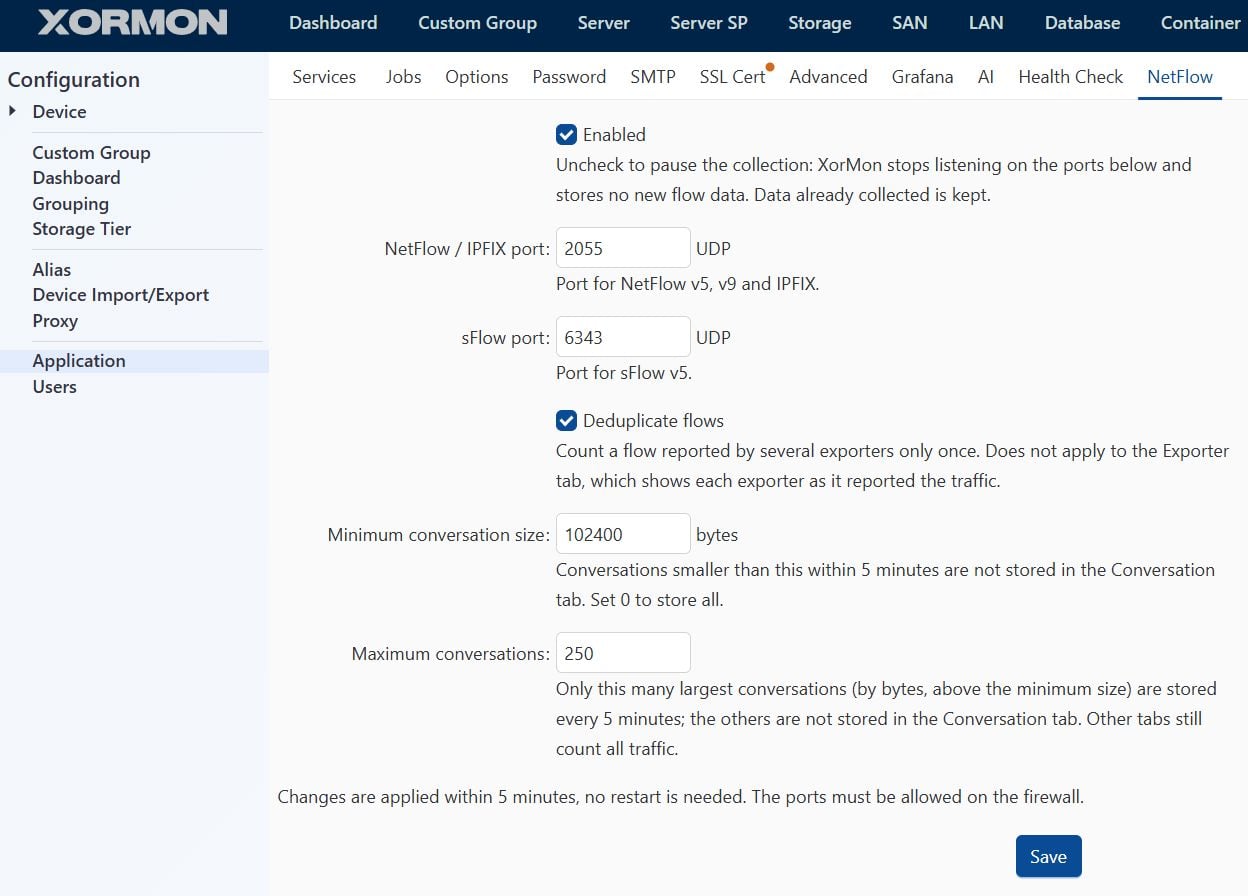
You can configure NetFlow / sFlow paraeters in Xormon's UI ➡ Settings ➡ Application ➡ NetFlow:
 |
XorMon's flow collector accepts NetFlow v5, NetFlow v9, IPFIX and sFlow v5, IPv4 and IPv6 traffic (NetFlow v5 carries IPv4 only).
XorMon's implementation does not intend to replace special NetFlow/sFlow analyzers, it act as simple, fast and easy to read view into the network traffic.
If there is a need for a deeper analyze then you should go to specialized tools.
The aim is present the biggest connection streams only.
Application bandwith:
:
VM conversation bandwith:
XorMon's implementation does not intend to replace special NetFlow/sFlow analyzers, it act as simple, fast and easy to read view into the network traffic.
If there is a need for a deeper analyze then you should go to specialized tools.
The aim is present the biggest connection streams only.
XorMon's implementation limits
- 'Conversation' data:
- TOP 250 connection in each 5mins (it is customizable)
- Connection must have traffic over 100kB/5mins (it is customizable)
- Data retention is 1 week
- Rest of data (aggregates per aplication, protocol, QoS):
- Standard for rest of data
Support
- NetFlow v5 / v9 / IPFIX: UDP port 2055 by default. v9 or IPFIX is preferred over v5. With Flexible NetFlow, IPFIX is selected by
export-protocol ipfixin the flow exporter. - sFlow v5: UDP port 6343 by default. sFlow sends sampled packets, not flows: bytes and packets are estimated as sample × sampling rate, and Flow Count counts samples.
- Destination: the XorMon server's IP address
- The ports and other collector options are set in XorMon: Settings ➡ Application ➡ NetFlow.
Where you can find it?
- UI ➡ LAN ➡ NetFlow
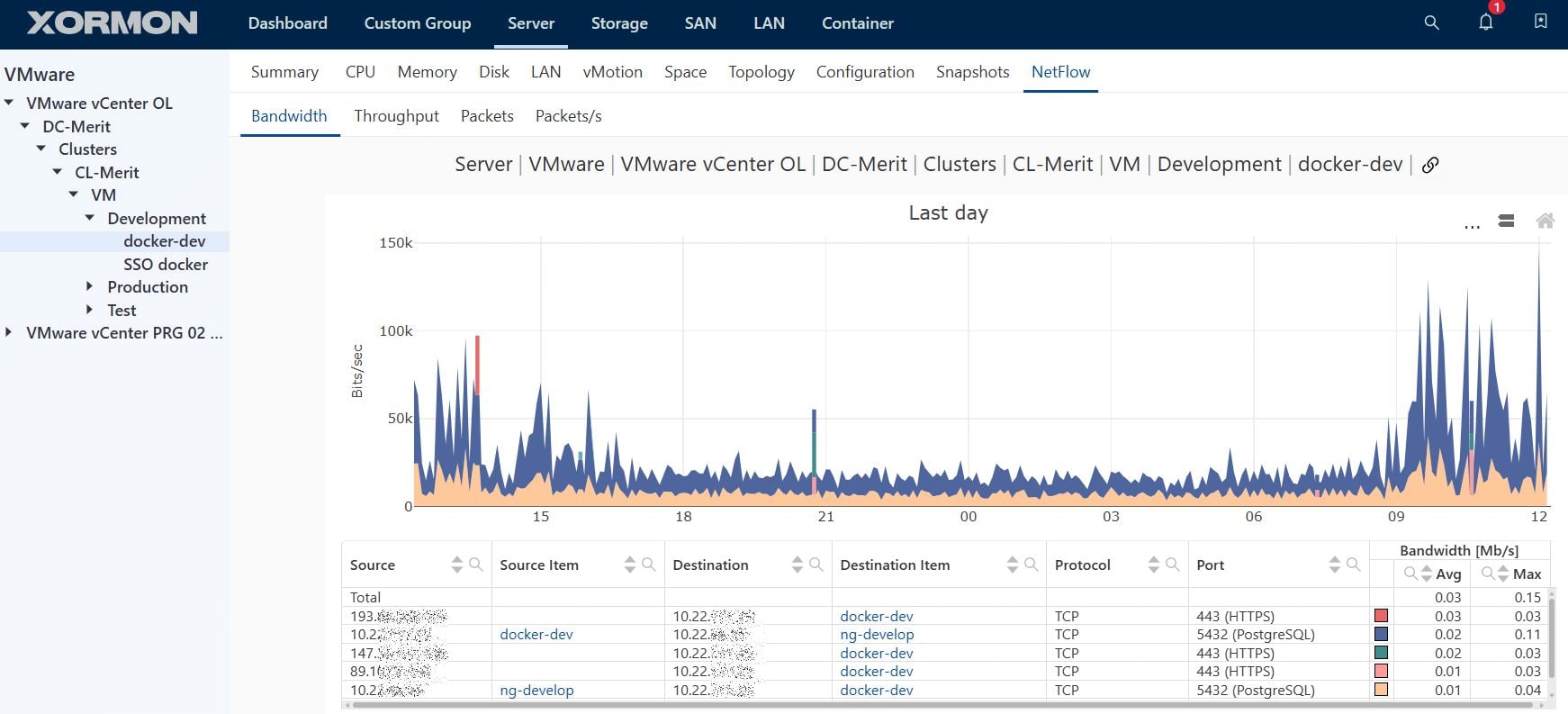
- Under VM ➡ NetFlow (if some data was collected for the VM): check the last example with VMware vM
Examples
Conversation bandwith: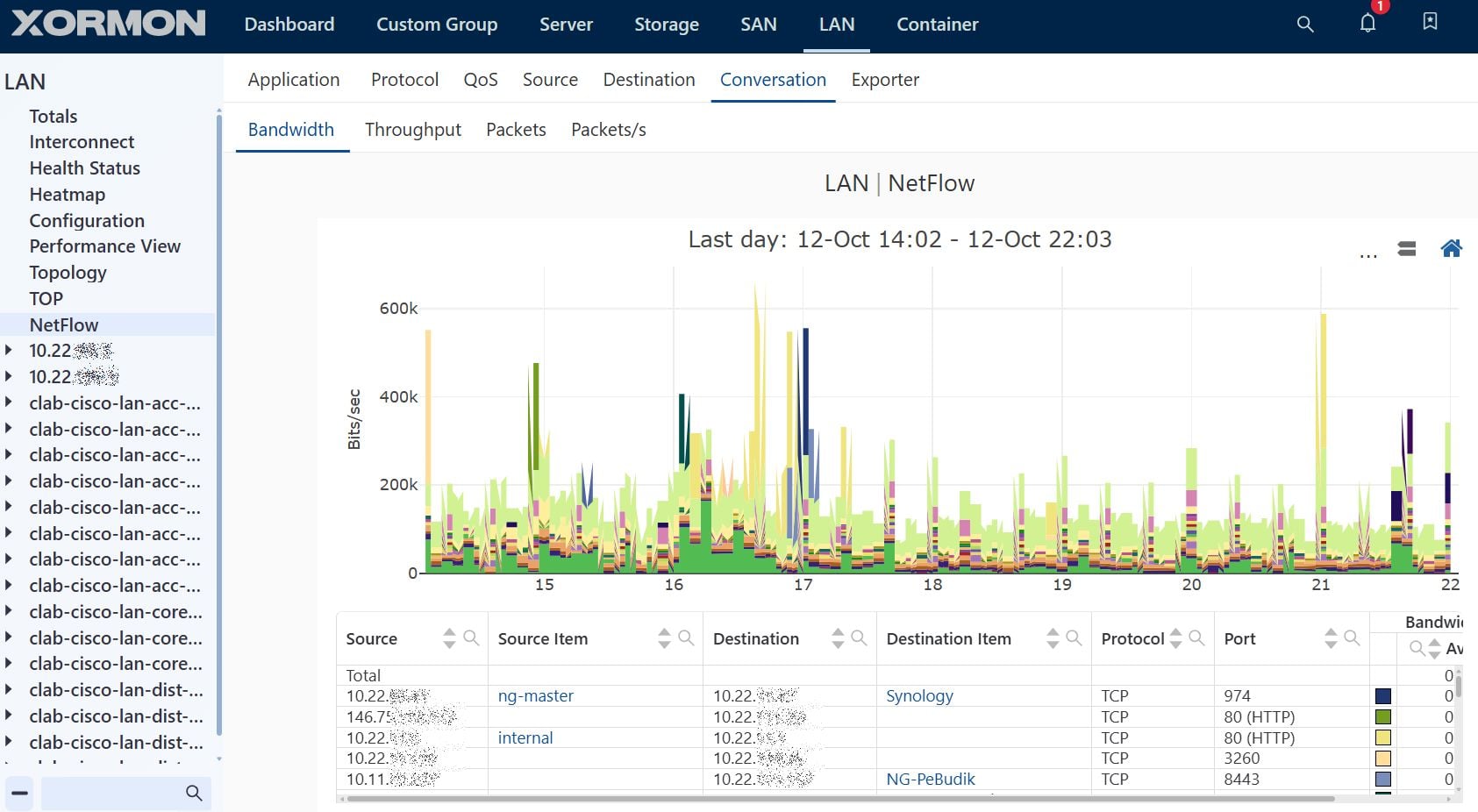 |
Application bandwith:
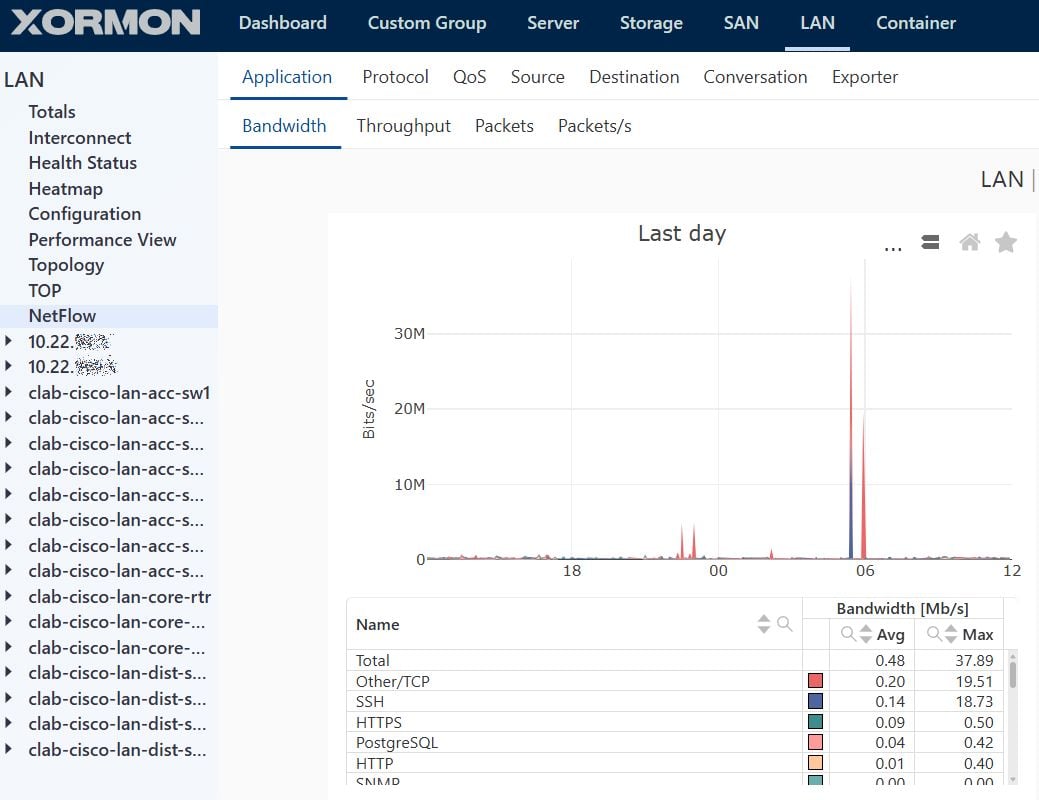 |
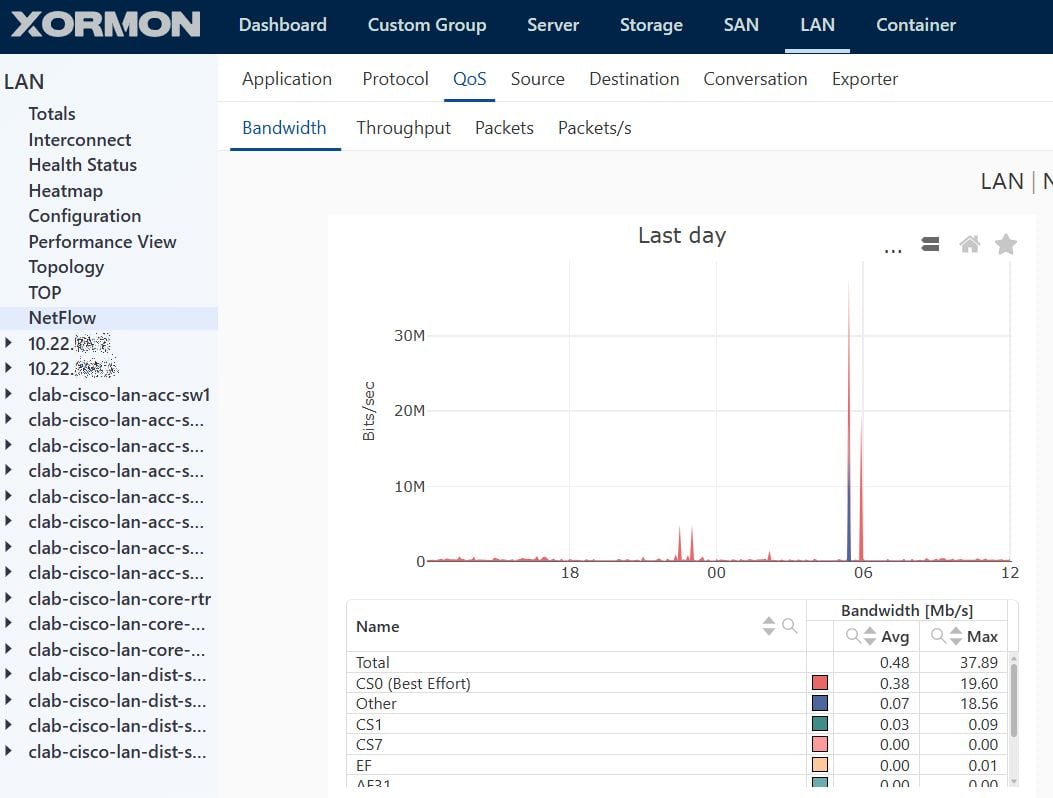 |
VM conversation bandwith:
 |
| NetFlow v9 / IPFIX | sFlow | |
|---|---|---|
| How it works | The device keeps a flow cache and exports one record per flow | The switch samples 1 in N packets in hardware and sends their headers |
| Accuracy | Exact bytes and packets per conversation (unsampled) | Statistical estimate; small or short conversations may not appear at all |
| Load on the device | CPU and memory for the flow cache, growing with the number of concurrent flows. Fine with hardware NetFlow, can be significant on software-based platforms | Low and constant, independent of the traffic volume |
| Export traffic to XorMon | Grows with the number of flows | Grows with packets / N, predictable |
| Typical devices | Cisco routers, Catalyst 9000, firewalls | High-speed data center / core switches (e.g. Nexus 3000/9000), most non-Cisco switches (Arista, Juniper, HPE Aruba, Dell) |
Recommendations
- Small and medium environments, WAN / Internet edge, links up to ~10 Gbit/s, or when you need exact per-conversation data (capacity planning, billing, security): NetFlow v9 or IPFIX, unsampled, on the edge devices.
- Large / data center environments, many 10 Gbit/s+ ports, or switches without hardware NetFlow: sFlow.
- Mixed: NetFlow/IPFIX on the edge routers, sFlow in the data center or campus core. Avoid exporting the same traffic both ways — XorMon keeps one copy of a flow reported by several exporters, but sFlow estimates and exact NetFlow counts never match exactly.
Keeping the device load low
- NetFlow/IPFIX: prefer platforms with hardware NetFlow and enable it on the devices where you need visibility (edge, uplinks, core) rather than on every access switch. Keep the timeouts from this guide (active 60 s, inactive 15 s). After enabling, watch the CPU and the flow cache (
show flow monitor XORMON-MONITOR statistics); if the cache overflows or the CPU is high, use sampled NetFlow or fewer devices. - sFlow: the sampling rate 1:N sets the trade-off between accuracy and load. A common rule of thumb is N ≈ link speed in Mbit/s (1:1000 for 1 Gbit/s, 1:10000 for 10 Gbit/s). A lower N gives more accurate data and more datagrams. Links with little traffic produce few samples per 5-minute interval, so their values are noisy.
How XorMon handles sFlow
- Bytes and packets are estimated as sample × sampling rate; Flow Count counts samples.
- The minimum conversation size (1024 B by default) rarely filters sFlow conversations: a single sample already counts as frame length × N bytes (e.g. 64 B × 1000 = 64 kB).
Cisco Classic NetFlow
IOS routers such as ISR G1/G2, IOS 12.4–15.x:! global ip flow-export version 9 ip flow-export destination <XORMON_IP> 2055 ip flow-cache timeout active 1 ip flow-cache timeout inactive 15 ! on every interface of the device (ingress only) interface GigabitEthernet0/1 ip route-cache flowOn later 12.4/15.x releases,
ip route-cache flow is replaced by:
interface GigabitEthernet0/1
 ip flow ingress
Verify with:
show ip flow export
show ip cache flow
Cisco Flexible NetFlow
Catalyst 9000, ISR 4000, IOS-XE 16.x+:flow record XORMON-RECORD match ipv4 protocol match ipv4 source address match ipv4 destination address match transport source-port match transport destination-port match interface input collect interface output collect counter bytes long collect counter packets long collect timestamp sys-uptime first collect timestamp sys-uptime last flow exporter XORMON-EXPORTER destination <XORMON_IP> transport udp 2055 export-protocol netflow-v9 source Loopback0 flow monitor XORMON-MONITOR record XORMON-RECORD exporter XORMON-EXPORTER cache timeout active 60 cache timeout inactive 15 ! on every interface of the device (input only) interface GigabitEthernet1/0/1 ip flow monitor XORMON-MONITOR inputVerify with:
show flow monitor XORMON-MONITOR cache
show flow exporter XORMON-EXPORTER statistics
IPFIX instead of NetFlow v9
Flow record, flow monitor and interface configuration stay the same; only the exporter's export protocol changes:flow exporter XORMON-EXPORTER destination <XORMON_IP> transport udp 2055 export-protocol ipfix source Loopback0XorMon receives NetFlow v9 and IPFIX on the same port and shows the same data for both, so either choice works. Classic NetFlow (
ip flow-export) cannot export IPFIX — use Flexible NetFlow for it.IPv6 traffic
The flow record above matches IPv4 only, so IPv6 traffic is not exported. Add a second record and monitor for IPv6 (the exporter is shared) and apply it to the same interfaces:flow record XORMON-RECORD-V6 match ipv6 protocol match ipv6 source address match ipv6 destination address match transport source-port match transport destination-port match interface input collect interface output collect counter bytes long collect counter packets long collect timestamp sys-uptime first collect timestamp sys-uptime last flow monitor XORMON-MONITOR-V6 record XORMON-RECORD-V6 exporter XORMON-EXPORTER cache timeout active 60 cache timeout inactive 15 ! on every interface of the device (input only), next to the IPv4 monitor interface GigabitEthernet1/0/1 ip flow monitor XORMON-MONITOR input ipv6 flow monitor XORMON-MONITOR-V6 inputVerify with:
show flow monitor XORMON-MONITOR-V6 cache
Classic NetFlow — a router can export to multiple destinations at once; just add a second line, nothing else changes:
Flexible NetFlow — a single
ip flow-export destination <XORMON_IP> 2055(the existing
ip flow-export destination <old_collector_ip> <port> line stays untouched)
Flexible NetFlow — a single
flow monitor can reference multiple exporters, so add a new exporter and attach it to the existing monitor (no need to touch interface config):
flow exporter XORMON-EXPORTER
 destination <XORMON_IP>
 transport udp 2055
 export-protocol netflow-v9
 source Loopback0

flow monitor <EXISTING-MONITOR>
 exporter XORMON-EXPORTER
If the platform only allows one exporter per monitor (some older 9300/9500 code trains restrict this), the alternative is a second flow monitor with the same
flow record and a second exporter, applied to the same interfaces in addition to the existing one (ip flow monitor <NEW-MONITOR> input).
Quick check on the XorMon server side
tcpdump -ni any udp port 2055Make sure the firewall allows inbound UDP/2055 from the switch.
XorMon expects sFlow v5 on UDP port 6343. The switch is identified by the agent address it puts into the datagrams (not by the source IP of the UDP packet), so set a stable agent / source address.
- Sample ingress traffic, on all ports of the switch, so that every packet is counted once.
- Sampling rate: a common rule of thumb is N ≈ link speed in Mbit/s (1:1000 for 1 Gbit/s, 1:10000 for 10 Gbit/s), see NetFlow or sFlow.
- Keep the sampled header size at the default (usually 128 bytes) or higher; XorMon reads the Ethernet, VLAN, IP and TCP/UDP headers from it.
- Counter samples (interface counters) are ignored by XorMon, the polling interval does not matter.
Cisco Nexus (NX-OS)
feature sflow
sflow sampling-rate 4096
sflow max-sampled-size 128
sflow collector-ip <XORMON_IP> vrf default
sflow collector-port 6343
sflow agent-ip <SWITCH_IP>
sflow data-source interface ethernet 1/1
Repeat
sflow data-source interface for every port. Verify with show sflow and show sflow statistics.
Arista EOS
sflow sample 16384
sflow destination <XORMON_IP> 6343
sflow source-interface Loopback0
sflow run
sFlow is then active on all Ethernet interfaces; exclude one with
no sflow enable in the interface configuration. Verify with show sflow.
Juniper (Junos)
set protocols sflow collector <XORMON_IP> udp-port 6343
set protocols sflow sample-rate ingress 2048
set protocols sflow agent-id <SWITCH_IP>
set protocols sflow interfaces ge-0/0/0.0
Repeat
interfaces for every port. Verify with show sflow and show sflow collector.
HPE Aruba (AOS-CX)
sflow collector <XORMON_IP> port 6343
sflow agent-ip <SWITCH_IP>
sflow sampling 4096
sflow
The global
sflow command enables it on all interfaces. Verify with show sflow.
Linux host (hsflowd)
Useful for servers and for testing the collector./etc/hsflowd.conf:
sflow {
  sampling = 1000
  collector { ip = <XORMON_IP> udpport = 6343 }
  pcap { dev = eth0 }
}
Then systemctl restart hsflowd.
Quick check on the XorMon server side
tcpdump -ni any udp port 6343Make sure the firewall allows inbound UDP/6343 from the switch.
- Enable NetFlow ingress only, on every interface of the device. Every packet then enters the device on exactly one interface and is counted once. Ingress + egress on all interfaces counts every packet twice.
- When the same traffic passes several exporters (access + core switch, two routers on one path), XorMon deduplicates it: if several exporters report the same flow (source/destination IP, ports, protocol) within one 5-minute interval, only the exporter that saw the most bytes of it is kept. This applies to Protocol, Application, QoS, Source, Destination and Conversation.
- Bandwidth, Throughput and Flow Count show each exporter separately, exactly as it reported the traffic; their Total is a plain sum of the exporters.
- Not recognised as duplicates: NAT between the exporters, different sampling rates, and ingress + egress on a single device. Prefer exporting from edge devices only, with ingress-only configuration.
- Deduplication can be turned off in XorMon: Settings ➡ Application ➡ NetFlow.