Fujitsu ETERNUS DX/AF monitoring
XorMon, open source under GPL v3, monitors Fujitsu ETERNUS DX S3 and newer storage through the ETERNUS CLI that the storage provides natively, over SSH on port 22 with a dedicated read-only user. It graphs IO, data throughput, latency and cache per pool, volume and host, plus capacity per pool and IO and data per port.
Which Fujitsu storage systems does XorMon monitor?
XorMon monitors Fujitsu ETERNUS DX and AF storage, from ETERNUS DX S3 to all newer models, and also Fujitsu Storage Scalar tape libraries.
Monitoring of ETERNUS Unified file data is not implemented yet. Fujitsu ETERNUS is listed among the storage vendors on the storage monitoring page, and Fujitsu Storage Scalar is covered on the tape library monitoring page.
Sources: installation section below, updated 2026-11-07, Storage monitoring, updated 2026-11-06, and Tape library monitoring, updated 2026-10-12.
Which Fujitsu ETERNUS metrics does XorMon collect?
XorMon graphs IO, data throughput, latency, block size and cache per pool and volume, IO, data, latency and cache per host, IO and data per port, and CPU busy per node.
Besides IOPS, throughput and latency, each pool has its capacity, captured once an hour and kept for up to 3 years as daily averages, a history usable for capacity planning. Storage performance data is kept from 5 minute averages for 3 months up to daily averages for 3 years.
Sources: Feature matrix, Fujitsu tab, and Data retention, updated 2026-05-04.
How does XorMon connect to Fujitsu ETERNUS storage?
XorMon reads the data through the ETERNUS CLI that the storage provides natively, over SSH on port 22 from the XorMon host to both MNT interfaces of the storage, with a dedicated xormon user.
This user is read-only and logs in with a password or with SSH keys.
Sources: installation section below, updated 2026-11-07, and XorMon deployment.
How does XorMon track Fujitsu ETERNUS health and configuration?
The feature matrix marks health status, performance alerting and hardware event alerting for Fujitsu ETERNUS, and Change Tracker records configuration changes of ETERNUS devices.
A performance alert can use any metric that XorMon collects, such as volume latency, with a threshold. An event alert is sent when a device turns red in the global health status dashboard, and a clear alert when it turns green again.
Sources: Feature matrix, Fujitsu tab, Alerting, updated 2026-10-13, and Change Tracker, updated 2026-10-19.
Key points
- Monitors Fujitsu ETERNUS DX and AF storage, DX S3 and newer, through the native ETERNUS CLI over SSH on port 22.
- IO, data throughput, latency and cache per pool, volume and host; capacity per pool; IO and data per port; CPU busy per node.
- Dedicated read-only xormon user, with password or SSH key login.
- Health status, performance and hardware event alerts, and configuration change tracking.
- Open source license (GPL v3); Fujitsu Storage Scalar tape libraries are covered too.
Installation and configuration for Fujitsu ETERNUS
XorMon uses Fujitsu ETERNUS CLI interface natively provided by the storage to get all necessary data (ssh access).Supported are Fujitsu ETERNUS DX S3 and all newers models.
Monitoring of Fujitsu ETERNUS Unified file data is not implemented yet.
Storage connectivity
-
Allow access from the XorMon host to the Fujitsu ETERNUS storage both MNT interfaces on port 22 (SSH) through your network.
- Storage access (select one of methind during adding storage into XorMon)
- User / password
- SSH keys:
Create ssh-keys on XorMon host under xormon user if do not exist yet.
It should already exist on the Virtual Appliance, skip it there.
ls -l ~/.ssh/id_rsa.pub
ssh-keygen -t rsa -N ""
  Generating public/private rsa key pair.
  Enter file in which to save the key (/home/stor2rrd/.ssh/id_rsa):
  ...
ls -l ~/.ssh/id_rsa.pub
  -rw-r--r-- 1 stor2rrd stor2rrd 382 Jun  1 12:47 /home/stor2rrd/.ssh/id_rsa.pub
New storage devices might require stronger key, use this one instead of above 'RSA'ssh-keygen -t ecdsa -b 521 -N ""
Convert ssh-keys into IETF format.
Storage import utility expects ssh-keys in IETF format.
Keys in usual *.pub format will be accepted but access will not work!$ ssh-keygen -e -f ~/.ssh/id_rsa.pub > id_rsa.pub.ietf $ ls -l id_rsa.pub.ietf -rw-r--r-- 1 stor2rrd stor2rrd 507 Jan 8 08:43 id_rsa.pub.ietf
You might need to add this into your SSH cfg in case ssh connection to the storage does not work especially in case ssh fails with: no matching host key type found. Their offer: ssh-rsavi ~/.ssh/config Host * HostKeyAlgorithms=+ssh-rsa PubkeyAcceptedAlgorithms=+ssh-rsa
- User / password
-
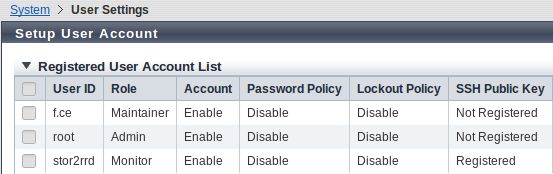
Create user xormon on the storage with monitor role.
Decide yourself if you use user/pasword or ssh key access methond.
(example uses 'stor2rrd' user but use 'xormon' preferably) System ➡ User Setting ➡ Setup User Account ➡ Add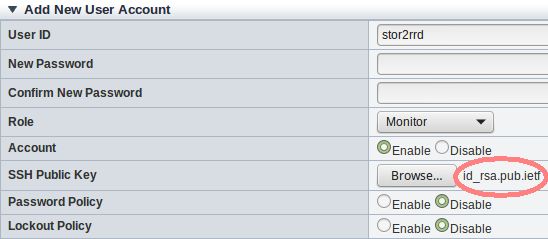
-
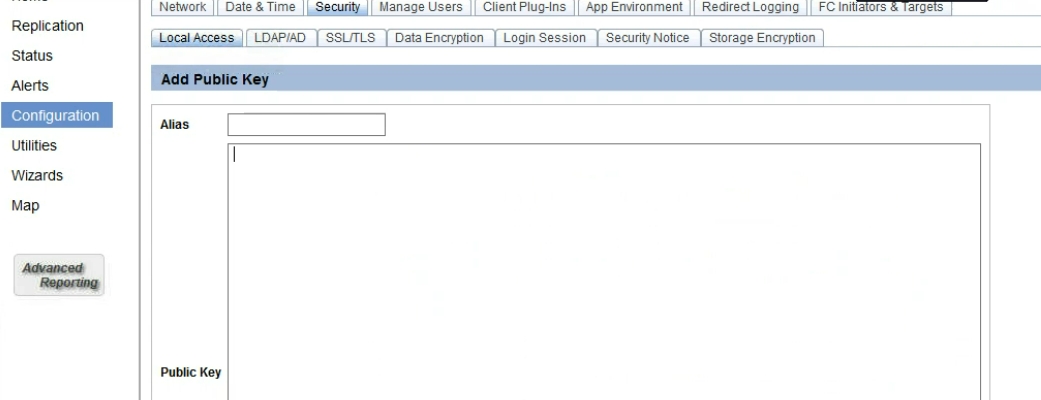
Newer storage firmwares use this path for ssh key insertion:
Configuration ➡ System ➡ Security ➡ Local Access ➡ select a user ➡ add ssh key
-
Make sure that performance monitoring collection is enabled on the storage and historical collection is set to 300 secs.
It must be set to 300 seconds to work correctly!
System ➡ Utility ➡ Start/Stop Perfmon ➡ Select 300 ➡ Apply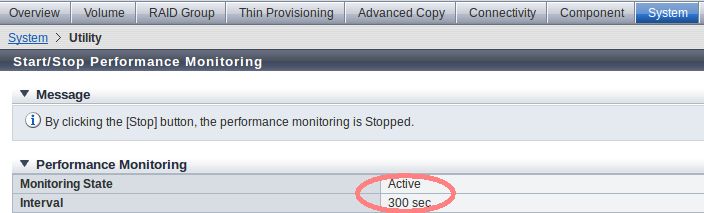
Note: this setting is reset (disabled) after each storage reboot at least with firmware release we have tested it.
It means that you have to enable performance monitoring and set interval after each storage reboot.
XorMon storage configuration
- Add storage into configuration from the UI:
Settings icon ➡ Device ➡ Storage ➡ New ➡ Vendor:device ➡ Fujitsu ETERNUS
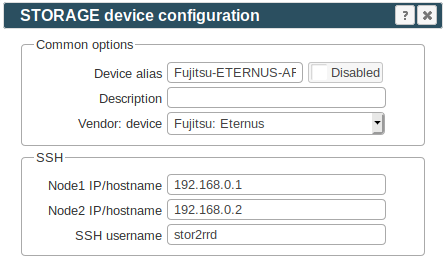
- Run "Test" for configured storage device, it must show "OK"
-
Wait about 1 hour, then reload the web browser, you should see it in XorMon UI
- Fujitsu ETERNUS: SSH connection failure on RHEL 9
When connecting to Fujitsu ETERNUS systems with old IPSSH-7.0.0 firmware, SSH login may fail with the following error:error in libcrypto invalid digest
This is caused by the legacy ssh-rsa host key algorithm used by the ETERNUS system.
Troubleshooting / fix:- As xormon, check the current crypto policy:
update-crypto-policies --show
- As root, enable SHA-1:
update-crypto-policies --set DEFAULT:SHA1
- As xormon, test the SSH connection:
ssh -o HostKeyAlgorithms=+ssh-rsa xormon@<Storage IP / hostname>
- As xormon, check the current crypto policy:
The full list of supported storage systems is on one page.
Dernière mise à jour :