HPE monitoring
XorMon, open source under GPL v3, monitors HPE storage: 3PAR, Primera, Alletra 9000 and Alletra MP through WSAPI (REST API), Nimble and Alletra 6000/5000 over SSH, MSA through WBI or SMI-S, StoreOnce through its REST API, and XP7 and XP8 as Hitachi VSP. It graphs IO, data throughput, latency and capacity per pool and volume.
Which HPE storage systems does XorMon monitor?
XorMon monitors HPE 3PAR, Primera, Alletra 9000 and Alletra MP, Nimble and Alletra 6000/5000, MSA, StoreOnce and XP7/XP8, each family with its own installation tab. StoreVirtual (LeftHand) is supported by STOR2RRD, a legacy tool.
HPE XP7 and XP8 are re-branded Hitachi VSP arrays, so XorMon adds them as Hitachi VSP. The feature matrix marks health status, performance alerting and hardware event alerting for the HPE families XorMon supports, and an event alert is sent when a device turns red in the global health status dashboard.
Sources: installation tabs below, updated 2026-11-07, Feature matrix, HPE tab, and Alerting, updated 2026-10-13.
How does XorMon connect to HPE 3PAR, Primera and Alletra 9000 or MP?
XorMon reads the data through WSAPI, the REST API of the array, with a dedicated xormon user on the storage. 3PAR and Alletra 9000 use port 8080, while Primera and Alletra MP might listen on port 443.
The 3PAR CLI and SSH access methods are not supported in XorMon, and WSAPI provides no VVOL data and no File Persona volume performance metrics. These arrays provide real per-host performance statistics, rather than host data aggregated from volumes. Primera and 3PAR also have detailed capacity monitoring per storage, pool and tier, with smart trending graphs for capacity planning.
Sources: 3PAR / Primera / Alletra tab below, updated 2026-11-07, Host data, updated 2026-05-04, and Capacity monitoring, updated 2026-11-05.
How does XorMon monitor HPE Nimble and Alletra 6000/5000?
XorMon uses the HPE Nimble API over SSH on port 22, with a dedicated xormon user on the storage and SSH key authentication.
The feature matrix lists IO, data throughput and latency per pool, volume, volume folder, drive and host for Nimble and Alletra 6000. It also lists cache hit per pool and IO, data and packets per port.
Sources: Nimble / Alletra tab below, updated 2026-11-07, and Feature matrix, HPE tab.
Which ports and users do HPE MSA and StoreOnce need?
HPE MSA needs port 443 for WBI, or ports 80 and 5988 (443 and 5989 when secured) for SMI-S, with a dedicated xormon user. StoreOnce needs port 443 (HTTPS) for its REST API, also with a xormon user.
WBI must be used on newer MSA models that do not support SMI-S. The feature matrix lists IO and data per pool, volume, RAID group, drive, port, host and node for MSA. For StoreOnce, it lists capacity, data, replication and jobs per pool, Catalyst and NAS data, and CPU.
Sources: MSA and StoreOnce tabs below, updated 2026-11-07, and Feature matrix, HPE tab.
Key points
- Monitors HPE 3PAR, Primera, Alletra 9000 and MP, Nimble, Alletra 6000/5000, MSA, StoreOnce and XP7/XP8 (added as Hitachi VSP).
- 3PAR, Primera and Alletra 9000 or MP: WSAPI (REST API) on port 8080 or 443.
- Nimble and Alletra 6000/5000: Nimble API over SSH on port 22.
- MSA through WBI or SMI-S; StoreOnce through its REST API on port 443.
- Health status, performance and hardware event alerts, free open source license (GPL v3).
Installation and configuration for HPE storage
- 3PAR / Primera
Alletra 9000 / MP - Nimble
Alletra 6k/5k - XP8
XP7 - MSA 2000/1000
(WBI) - MSA 2000/1000
(SMI-S) - StoreOnce
- StoreVirtual
LeftHand
Do you want to let us know your priorities? Vote for your missing features and device support. More votes, bigger priority for us.
List of not supported technologies yet
- HPE 3PAR WSAPI (REST API): supported with WSAPI 1.6.5+ (3PAR 3.3.1 MU5 and newer)
- HPE 3PAR CLI: must be used on older fw
It is not actually supported XorMon, use STOR2RRD instead - SSH to HPE 3PAR CLI: same as the CLI one access only via SSH keys or password
It is not actually supported in XorMon, use STOR2RRD instead
 |
HPE 3PAR WSAPI
Configuration
-
Allow access from the XorMon host to the 3PAR / Alletra 9000 storage on port 8080.
Primera and Alletra MP might listen on port 443.
- Create user xormon on the storage with browse role and enable it for all domains:
$ ssh 3paradm@3par_storage 3paradm's password: ****** cli% createuser -c testpw xormon all browse cli% exit $ ssh xormon@3par_storage cli% showuser Username Domain Role Default xormon all browse N - WSAPI (REST API)
Use it for HPE 3PAR WSAPI version 1.6.3+ (Sep 2018).
No need to install additional software.
This method does not support VVOL monitoring as the storage API does not provide such data
File Persona alert: Performance metrics for File Persona Volumes are not collected and displayed when using REST API.
NOTE: Health Status for individual disk drives has been added in WSAPI 1.6.15 (HPE 3PAR 3.3.2), older provide just limited set of health status data
- Enable WSAPI in HPE 3PAR CLI
Make note of API URL IP address and port number: 192.168.1.1 and 8080 in the above example
cli% setwsapi -https enable
cli% showwsapi
  -Service- -State- -HTTP_State- HTTP_Port -HTTPS_State- HTTPS_Port -Version- ------------API_URL------------
  Enabled   Active  Enabled           8008 Enabled             8080 1.6.3     https://192.168.1.1:8080/api/v1
3PAR uses SSL port 8080, Primera and Alletra MP 443
- Open WSAPI port from XorMon to HPE 3PAR / Primera management IP address/ hostname on the firewall
XorMon storage configuration
-
Add storage into configuration from the UI:
XorMon UI: Settings icon ➡ Device ➡ Storage ➡ New ➡ Vendor:device ➡ HPE 3PAR

- Run "Test" for configured storage device, it must show "OK"
-
Wait about 1 hour, then reload the web browser, you should see it in XorMon UI
Add it as Hitachi VSP.
SMI-S API is used for getting performance data.
WBI API for configuration data.
Note that new storage devices do not contain SMI-S API, therefore use WBI method instead only.
G2 and older models are not supported, they do not have SMI-S neither WBI API interfaces.
Storage connectivity
-
Allow access from the XorMon host to the storage on ports 80 (WBI) and 5988 (SMI-S).
If you use https and secure SMI-S then test ports 443 and 5989 instead.
If you use storage cmd line configuration like in examples below (you can use the storage UI instead) then port 22 (ssh) must be open.
- Make sure that secure SMI-S (port 5989) and WBI HTTPS (port 443) protocols are enabled on the storage
- CMD line:
If secure SMI-S or WBI HTTPS are not enabled:
$ ssh -l manage <storage_hostname>
# show protocols
  Service and Security Protocols
  ------------------------------
  Web Browser Interface (HTTP): Enabled
  Secure Web Browser Interface (HTTPS): Enabled
  Command Line Interface (Telnet): Disabled
  Secure Command Line Interface (SSH): Enabled
  Storage Management Initiative Specification (SMI-S): Enabled
  Unsecure Storage Management Initiative Specification (SMI-S 5988): Disabled
  ...
# set protocols smis enabled
# set protocols https enabled
- UI:
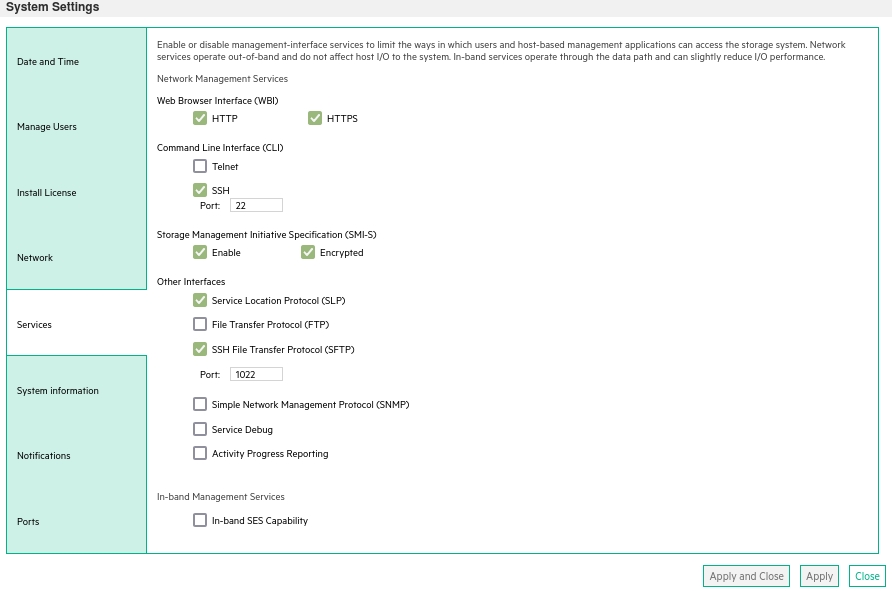
- CMD line:
-
Create user xormon on the storage with monitor and standard roles, allow SMI-S and WBI.
- CMD line method:
Adjust password to your preferred one from used Test1234.$ ssh -l manage <storage_hostname> # create user interfaces smis,wbi locale English password Test1234 roles monitor,standard xormon
-
UI:
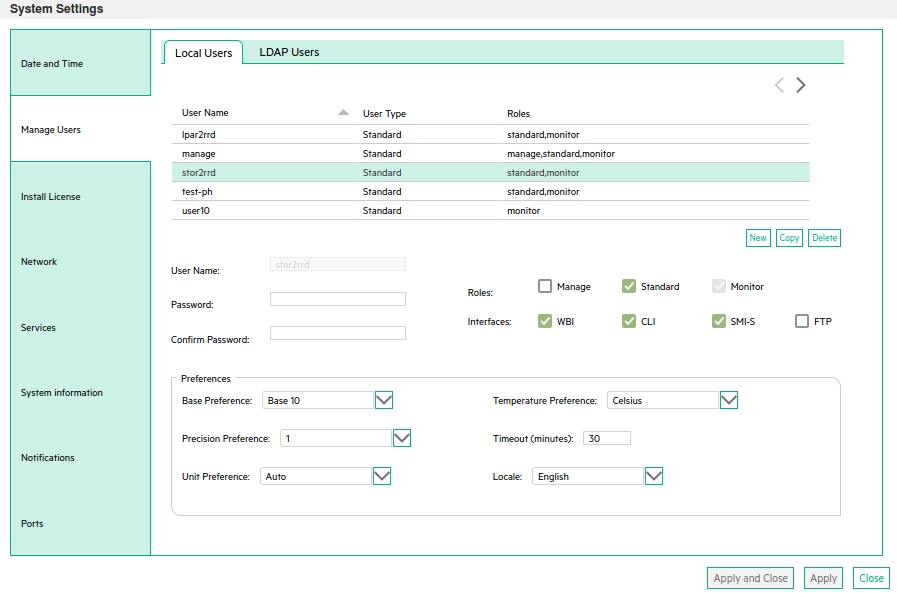
(example uses 'stor2rrd' user but use 'xormon' preferable)
- CMD line method:
XorMon storage configuration
-
Add storage into configuration from the UI:
XorMon UI: Settings icon ➡ Device ➡Storage ➡ New ➡ Vendor:device ➡ HPE MSA 2000/1000 ➡ SMI-S

If you set https in above storage properties then this must be enabled on the storage:$ ssh -l manage <storage_hostname> # show protocols ... Secure Web Browser Interface (HTTPS): Enabled Storage Management Initiative Specification (SMI-S): Enabled ...
If you use http then this:Web Browser Interface (HTTP): Enabled Unsecure Storage Management Initiative Specification (SMI-S 5988): Enabled
-
Do not use shell special characters like @#!?|$*[]\{}`"'& in the password, use rather ;:.+- instead.
- Run "Test" for configured storage device, it must show "OK"
-
Wait about 1 hour, then reload the web browser, you should see it in XorMon UI
Storage connectivity
-
Allow access from the XorMon host to the HPE Nimble storage on port 22 (ssh).
-
Create user xormon on the storage with guest role.
- Create ssh-keys on XorMon host under xormon user if do not exist yet.
Type enter instead of passphrase# su - xormon $ ls -l ~/.ssh/id_rsa.pub $ ssh-keygen -t rsa -N "" Generating public/private rsa key pair. Enter file in which to save the key (/home/xormon/.ssh/id_rsa): ... $ ls -l ~/.ssh/id_rsa.pub -rw-r--r-- 1 xormon xormon 382 Jun 1 12:47 /home/xormon/.ssh/id_rsa.pub
You might need to add this into your SSH cfg in case of rsa using on OpenSSH 8.8+ especially in case ssh connection fails with: "no matching host key type found. Their offer: ssh-rsa"vi ~/.ssh/config Host * HostKeyAlgorithms=+ssh-rsa PubkeyAcceptedAlgorithms=+ssh-rsaNew storage devices might require stronger key, use this one instead of above 'RSA'$ ssh-keygen -t ecdsa -b 521 -N ""
- Add xormon ssh rsa key, all is one line in sshkey command
Only Administrator role can add ssh keys. Therefore log as admin for adding of xormon user ssh key.$ cat ~/.ssh/id_rsa.pub $ ssh -l admin 192.168.1.1 Nimble OS $ sshkey --add xormonkey --user xormon --type rsa --key "AAAAB3NzaC1...gOPqT [email protected]" Nimble OS $ sshkey --list --user xormon --------------------+------------------------------+--------- User Name Type- --------------------+------------------------------+--------- xormon xormonkey rsa
-
Try ssh connection:
$ ssh [email protected] "array --list"
  ---------------------+-----------------+-----------+----------------+-----------
  Name                  Serial            Model       Version          Status
  ---------------------+-----------------+-----------+----------------+-----------
  nimble01              VM-004531         Virtual     3.3.0.0-363982-opt reachable
XorMon storage configuration
-
Add storage into configuration from the UI:
XorMon UI: Settings icon ➡ Device ➡ Storage ➡ New ➡ Vendor:device ➡ HPE Nimble

In case of you are using more than one Nimble array on the same Nimble mgmt server then you have to configure each array separately in the XorMon UI.
Use the same SSH access for each array in the XorMon configuration (Host name or IP, SSH port, SSH user).
Only "Array name" will be different and should reflect array which you want to monitor.
- Run "Test" for configured storage device, it must show "OK"
-
Wait about 1 hour, then reload the web browser, you should see it in XorMon UI
Supported is storage firmware version 4.x at least.
StoreOnce 3.x is supported in our 1st generation tool STOR2RRD.
Storage connectivity
-
Allow access from the XorMon host to the storage on port 443 (https).
-
Create user xormon on StoreOnce node with user role.

(example uses 'stor2rrd' user but use 'xormon' preferable)
XorMon storage configuration
-
Add storage into configuration from the UI:
XorMon UI: Settings icon ➡ Device ➡ Storage ➡ New ➡ Vendor:device ➡ HPE StoreOnce

- Run "Test" for configured storage device, it must show "OK"
-
Wait about 1 hour, then reload the web browser, you should see it in XorMon UI
WBI access must be used on new storage models which do not support SMI-S protocol.
Storage connectivity
-
Allow access from the XorMon host to the storage on ports 443.
- Make sure that secure and WBI HTTPS (port 443) protocol is enabled on the storage
- CMD line:
If secure WBI HTTPS is not enabled:
$ ssh -l manage <storage_hostname>
# show protocols
  Service and Security Protocols
  ------------------------------
  ...
  Secure Web Browser Interface (HTTPS): Enabled
  ...
# set protocols https enabled
- UI:
- CMD line:
-
Create user xormon on the storage with monitor and standard roles, allow WBI.
- CMD line method:
Adjust password to your preferred one from used Test1234.$ ssh -l manage <storage_hostname> # create user interfaces wbi locale English password Test1234 roles monitor,standard xormon
-
UI:
(example uses 'stor2rrd' user but use 'xormon' preferable)
- CMD line method:
XorMon storage configuration
-
Add storage into configuration from the UI:
XorMon UI: Settings icon ➡ Device ➡ Storage ➡ New ➡ Vendor:device ➡ HPE MSA 2000/1000 ➡ WBI
If you set https in above storage properties then this must be enabled on the storage:$ ssh -l manage <storage_hostname> # show protocols ... Secure Web Browser Interface (HTTPS): Enabled ...
If you use http then this:Web Browser Interface (HTTP): Enabled
- Run "Test" for configured storage device, it must show "OK"
-
Wait about 1 hour, then reload the web browser, you should see it in XorMon UI
XorMon monitors storage from other vendors too: see storage performance monitoring for every supported system.
Dernière mise à jour :