XorMon Upgrade
You can whenever return to the previous XorMon version, all will be re-verted, data perists, via single CLI command.
Under 'xormon' user:
Under 'xormon' user:
cd xormon-ng
./xormon.sh rollback
  ...
  The rollback was successful
  =============================================================================
  Starting previous version... (log: /home/xormon/xormon-ng/server-nest/logs/upgrade.log)
  Xormon is running under the same UID (1000)
  =============================================================================
  STARTING AFTER INSTALL / UPGRADE...
  Connection to database postgres was successful!

  Looking for database xormon
  Connection to database xormon was successful!

  Exiting verify.ts...
  Application launched successfully
  [2026-06-29T14:15:51.000Z] Rollback finished (rc=0)
XorMon appliance is based on standard Debian Linux 13.
We do not provide operating system level patches or fixes.
Patch it as you need, XorMon application should not be affected anyhow by that.
We do not provide operating system level patches or fixes.
Patch it as you need, XorMon application should not be affected anyhow by that.
Node.js
If you are upgrading XorMon from v2.1.x or earlier to v2.2.0+ or later, you must upgrade Node.js before XorMon upgrade.Node.js v24 upgrade docu
XorMon
- Go to Settings icon on the top-right
- Select 'Help' -> 'Upgrade'
- Use the link provided to download the latest xormon-ng-<ver>.tar.gz to your workstation,
or visit Download - Click 'Select File' and provide path to xormon-ng-<ver>.tar.gz
- Click 'Upload & Apply' and wait for 'Upgrade Successful' message
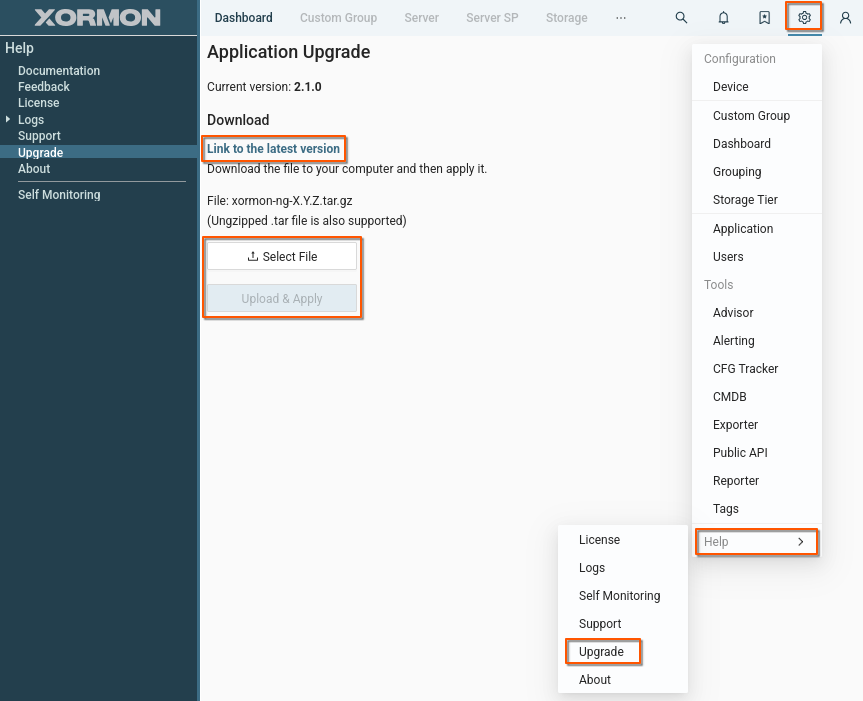 |
- Wait for the browser to refresh. It can take up to 5 minutes.
- If the application does not come up even after 10 minutes, try to start it up manually and check for errors, at first check if it is running:
cd /home/xormon/xormon-ng/
./xormon.sh status
./xormon.sh start
Ignore message "PM2 fail to start" at the end of the start procedure if apears.
- In case of any error or fail, try CLI method where errors are better visible.
Node.js
If you are upgrading XorMon from v2.1.x or earlier to v2.2.0+ or later, you must upgrade Node.js before XorMon upgrade.Node.js v24 upgrade docu
XorMon
- Download XorMon package file "xormon-ng-<ver>.tar.gz" to /tmp
- Log in as user xormon
- Upgrade
cd /home/xormon/xormon-ng/
./xormon.sh stop

# Use always absolute path to the xormon package!
./xormon.sh upgrade /tmp/xormon-ng-<ver>.tar.gz
Application should come up in a few minutes, check the UI
- If the application does not come up even after 10 minutes, try to start it up and check for errors, at first check if it is running:
cd /home/xormon/xormon-ng/
./xormon.sh status
./xormon.sh start
Ignore message "PM2 fail to start" at the end of the start procedure if apears.
Do not use 'Application Upgrade' form in UI!
Docker-compose method
docker-compose pull
docker-compose up -d
Docker run method from the local image
- Download XorMon Docker package "xormon-ng-docker-<ver>.tar.gz"
- Load, stop, remove and re-run XorMon container
- Upgrade to the latest version:
docker load < xormon-ng-docker-<version>.tar.gz docker rm -f {UUID|name} docker run --init -d --name xormon --ulimit core=0 -p 8443:8443 -p 8162:8162 \ -v /var/xormon-ng/files:/usr/src/app/server-nest/files \ --link timescaledb:timescaledb --env-file ./xormon-ng.env xorux/xormon-ng:latest - If you wish to use other version or install the image manually, use docker load
docker load < xormon-ng-docker-<version>.tar.gz
docker rm -f {UUID|name}
docker run --init -d --name xormon --ulimit core=0 -p 8443:8443 -p 8162:8162 \
-v /var/xormon-ng/files:/usr/src/app/server-nest/files \
--link timescaledb:timescaledb --env-file ./xormon-ng.env <image>
<image> ... version of your loaded image