Server Service Processor
Prerequisites
- Create a new read-only user in Dell OpenManage.
- Enable access from the XorMon host to Dell OpenManage, port 443.
XorMon configuration
-
Add Dell OpenManage into configuration from the UI:
XorMon UI ➡ Settings icon ➡ Device ➡ Server SP ➡ Add new device ➡ Dell OpenManage
-->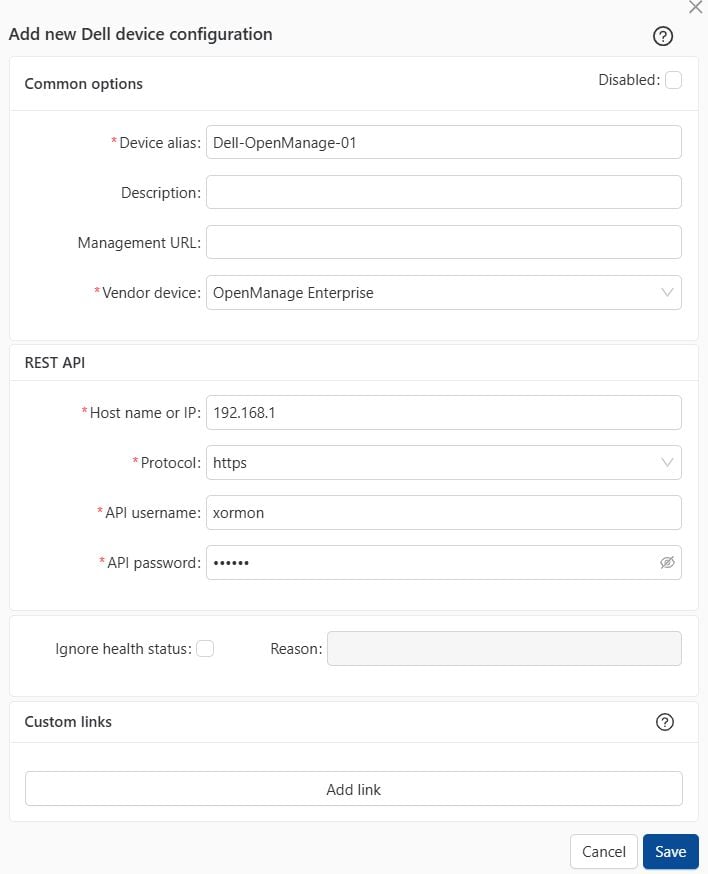
- Run "Test" for configured device, it must show "OK"
-
Wait about 1 hour, then reload the web browser, you should see it in XorMon UI
h4>Prerequisites
- Create a new read-only user in Cisco UCS Manager host as per this docu.
- Enable access from the XorMon host to Cisco UCS service processor, port 443.
XorMon configuration
-
Add Cisco UCS Manager host into configuration from the UI:
XorMon UI ➡ Settings icon ➡ Device ➡ Server SP ➡ Add new device ➡ Cisco UCS Manager
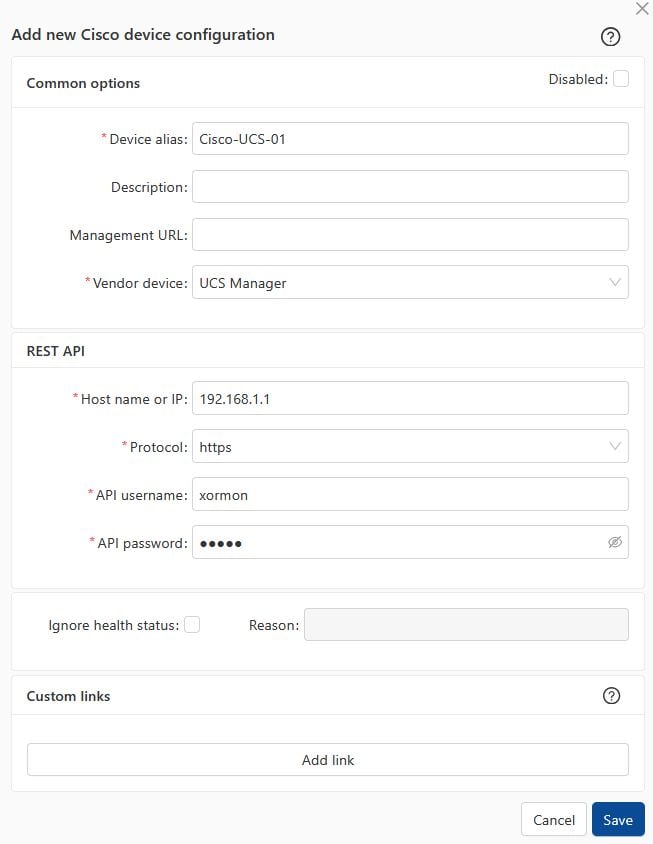
- Run "Test" for configured device, it must show "OK"
-
Wait about 1 hour, then reload the web browser, you should see it in XorMon UI
Prerequisites
- Create a new read-only user in Supermicro host
- Enable access from the XorMon host to Supermicro service processor, port 443
XorMon configuration
-
Add Supermicro host into configuration from the UI:
XorMon UI ➡ Settings icon ➡ Device ➡ Server SP ➡ Add new device --> Supermicro
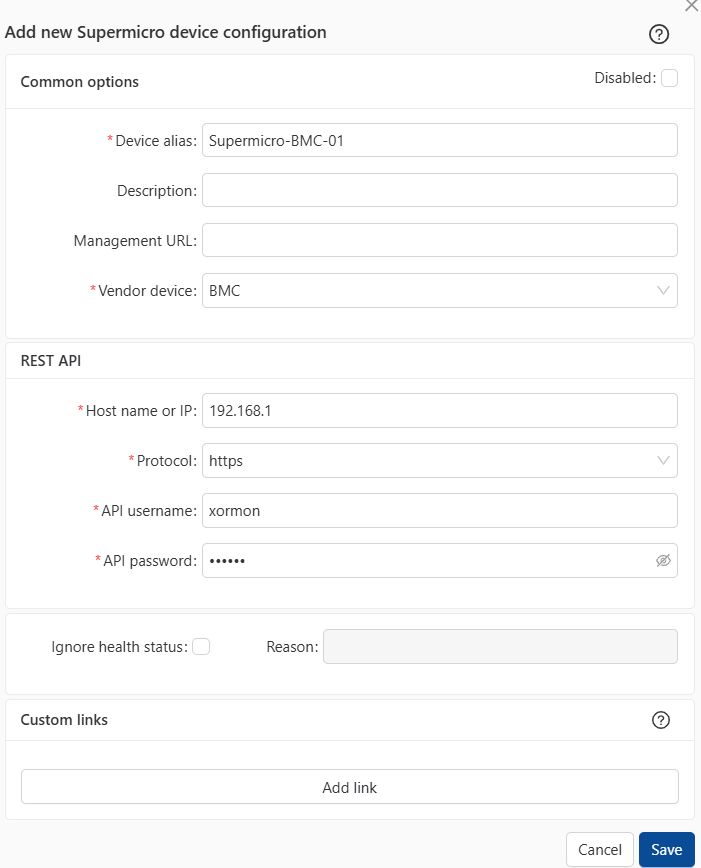
- Run "Test" for configured device, it must show "OK"
-
Wait about 1 hour, then reload the web browser, you should see it in XorMon UI
Product uses HPE OneView REST API to get necessary data.
Prerequisites
- Enable access from the XorMon host to HPE OneView 443
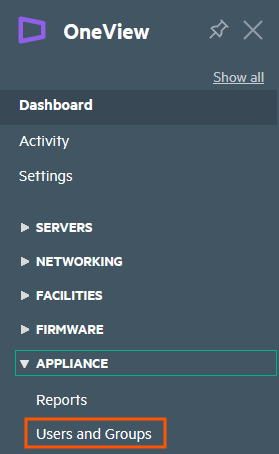
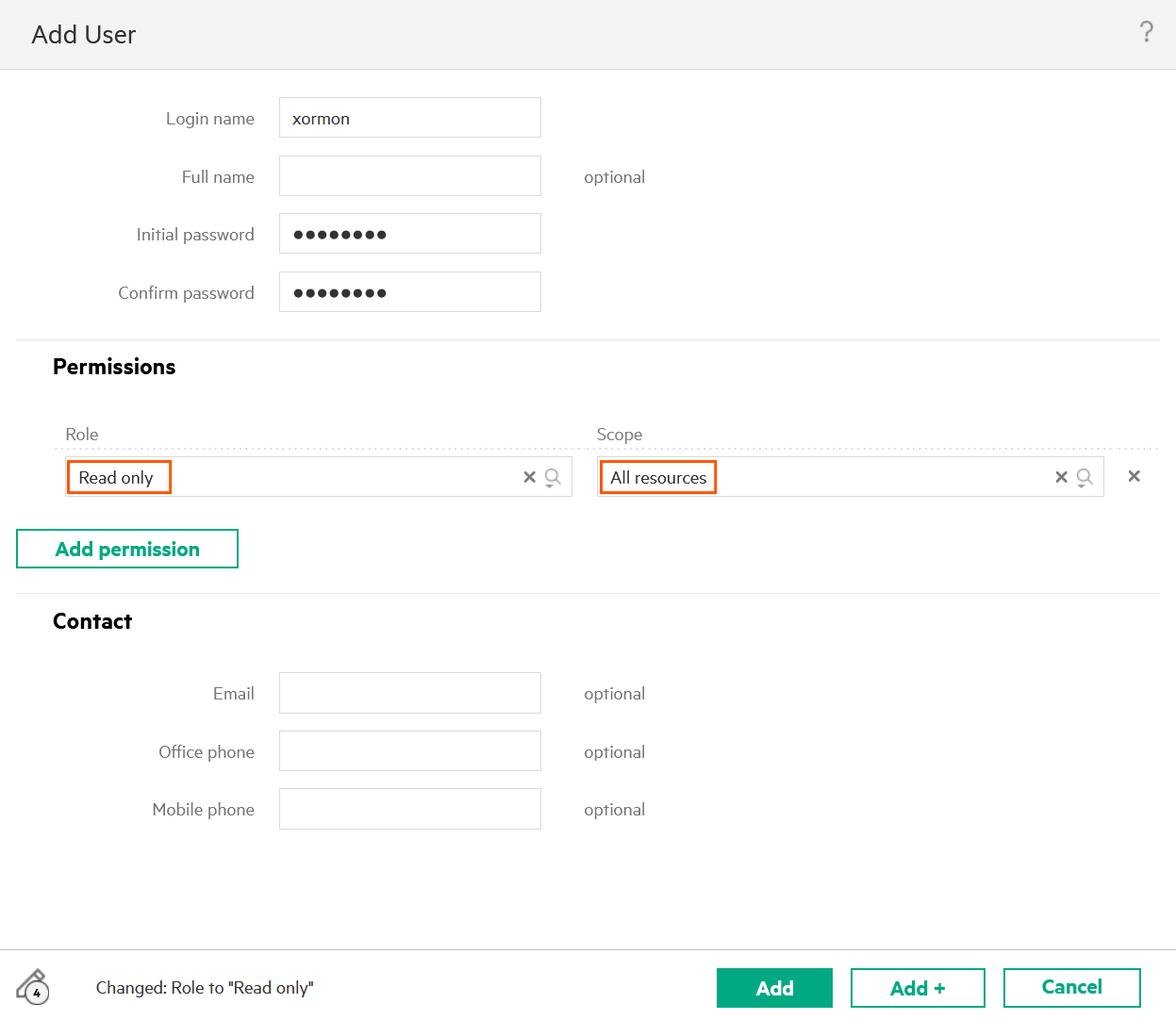
- Create read-only user with access to all resources.
- Go to Appliance ➡ User and Groups
- Assign "Read only" role for all resources
XorMon configuration
-
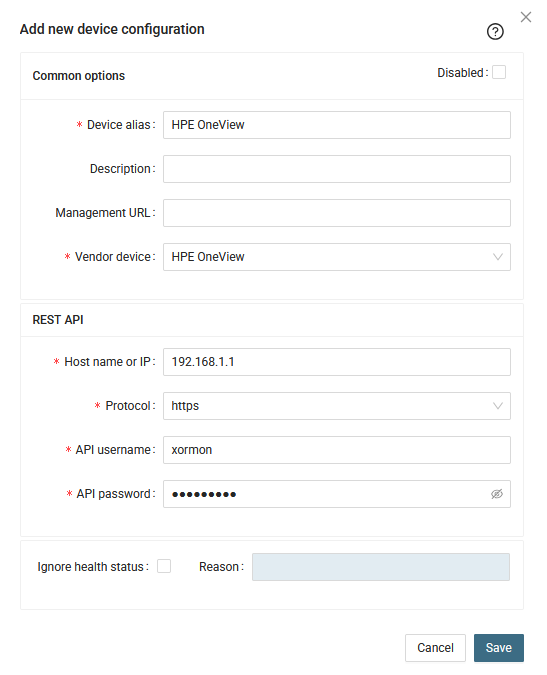
Add HPE OneView into configuration from the UI:
XorMon UI ➡ Settings icon ➡ Device ➡ Server SP ➡ HPE OneView ➡ New:
- Transport Layer Security:
XorMon uses TLSv1.2 by default for Service Processors, connection can fail if the target device has stricter security settings.
You can set the protocol version manually in Advanced settings for each device or on the microservice level.
Configure TLS using OpenSSL vendor docu
- Per device setup: UI ➡ Settings ➡ Device ➡ Server SP ➡ [DEVICE] ➡ Advanced settings
- Global setup: UI ➡ Settings ➡ Application ➡ Services ➡ HPE OneView ➡ Advanced settings
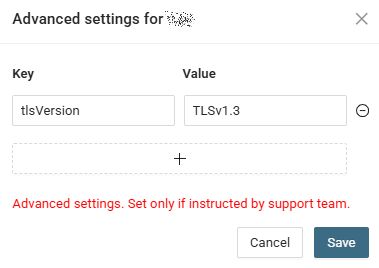
Key: tlsVersion
Value: TLSv1.1 or TLSv1.2 or TLSv1.3
- Run "Test" for configured device, it must show "OK"
-
Wait about 1 hour, then reload the web browser, you should see it in XorMon UI
Prerequisites
- Enable access from the XorMon host to one Dell iDRAC service processor on port 443
Actually is not supported connection to more services processors on the single server
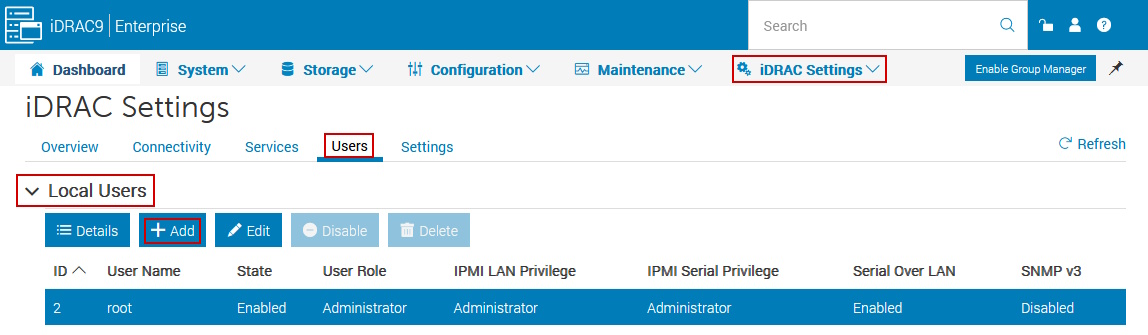
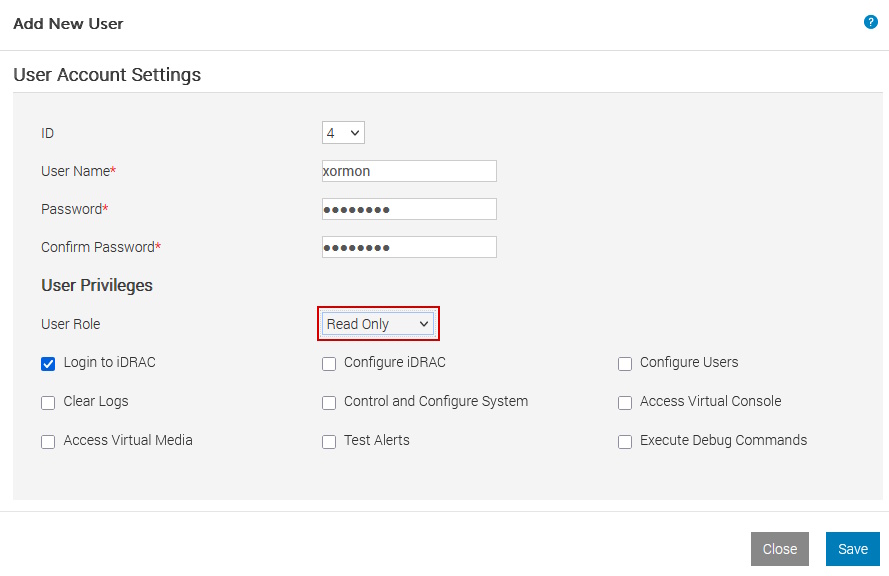
- Create a new user in iDRAC:
Go to iDRAC Settings ➡ Users ➡ Local Users ➡ Add
- User Role: Read Only
- IPMI User Privileges: No access
- SNMPv3 Settings: Disabled
- 2-Factor Authentication: Disabled
XorMon configuration
-
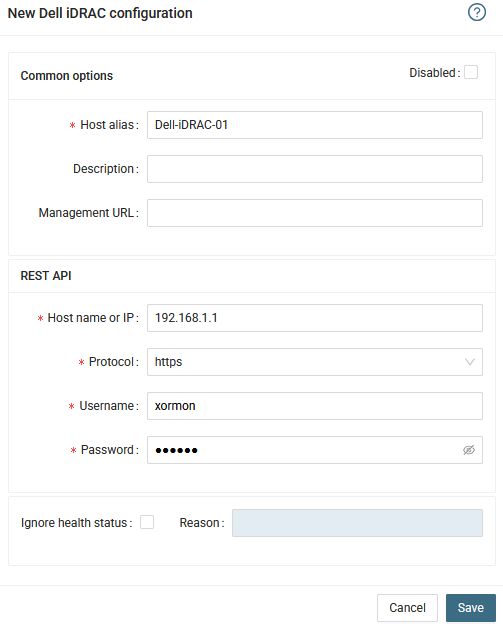
Add iDRAC into configuration from the UI:
XorMon UI ➡ Settings icon ➡ Device ➡ Server SP ➡ Dell iDRAC ➡ New:
- Transport Layer Security:
XorMon uses TLSv1.2 by default for Service Processors, connection can fail if the target device has stricter security settings.
You can set the protocol version manually in Advanced settings for each device or on the microservice level.
Configure TLS using OpenSSL vendor docu
- Per device setup: UI ➡ Settings ➡ Device ➡ Server SP ➡ [DEVICE] ➡ Advanced settings
- Global setup: UI ➡ Settings ➡ Application ➡ Services ➡ Dell iDRAC ➡ Advanced settings
Key: tlsVersion
Value: TLSv1.1 or TLSv1.2 or TLSv1.3
- Run "Test" for configured device, it must show "OK"
-
Wait about 1 hour, then reload the web browser, you should see it in XorMon UI
Prerequisites
- Enable access from the XorMon host to one Lenovo XClarity service processor on port 443
Actually is not supported connection to more services processors on the single server
- Create a new user (xormon) as per Lenovo XClarity docu with read only role
XorMon configuration
-
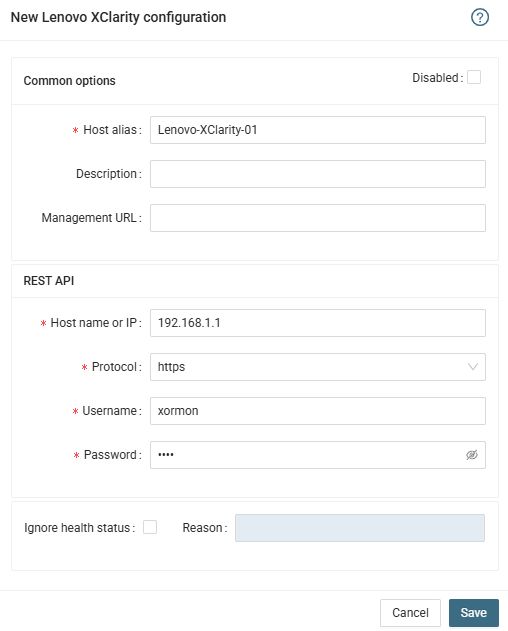
Add Xclarity into configuration from the UI:
XorMon UI ➡ Settings icon ➡ Device ➡ Server SP ➡ Lenovo XClarity ➡ New:
- Transport Layer Security:
XorMon uses TLSv1.2 by default for Service Processors, connection can fail if the target device has stricter security settings.
You can set the protocol version manually in Advanced settings for each device or on the microservice level.
Configure TLS using OpenSSL vendor docu
- Per device setup: UI ➡ Settings ➡ Device ➡ Server SP ➡ [DEVICE] ➡ Advanced settings
- Global setup: UI ➡ Settings ➡ Application ➡ Services ➡ Lenovo XClarity ➡ Advanced settings
Key: tlsVersion
Value: TLSv1.1 or TLSv1.2 or TLSv1.3
- Run "Test" for configured device, it must show "OK"
-
Wait about 1 hour, then reload the web browser, you should see it in XorMon UI
Data is obtained from HPE iLO via its REST API.
Supported is iLO4 FW 2.30+, which was apparenty introduced on HPE gen9 servers.
Support for CPU Physical, IO Bus and Memory Bus graphs is from iLO5 1.40+.
Supported is iLO4 FW 2.30+, which was apparenty introduced on HPE gen9 servers.
Support for CPU Physical, IO Bus and Memory Bus graphs is from iLO5 1.40+.
Prerequisites
- Enable access from the XorMon host to one HPE iLO service processor on port 443
Actually is not supported connection to more services processors on the single server
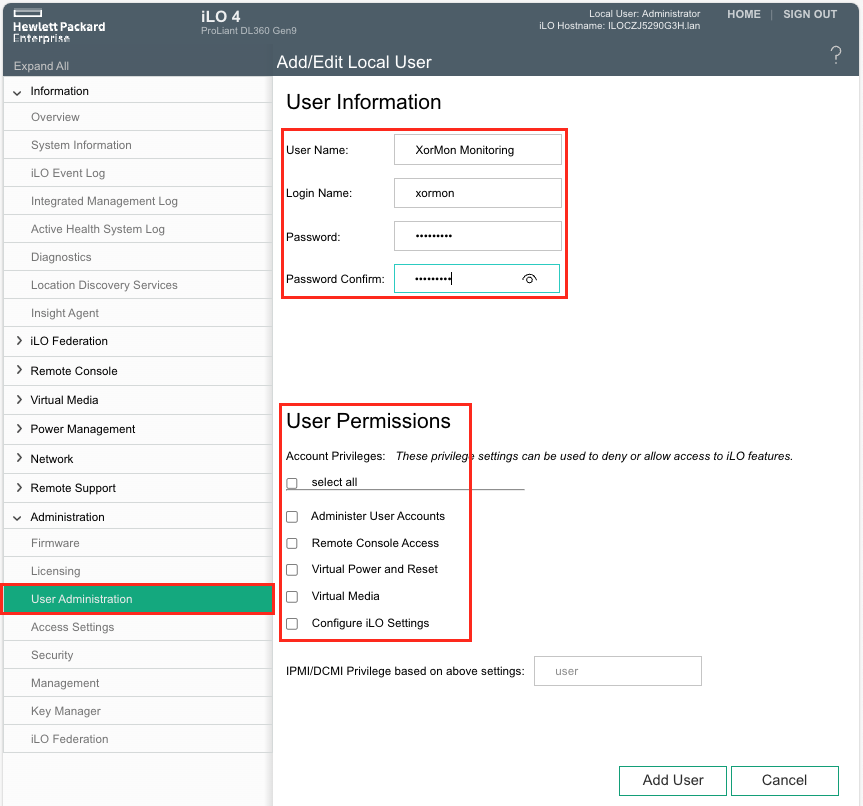
- Create a new user in iLO:
Go to Administatration ➡ User Administration
Create new user
Do not assign any Permissions - this will create a read-only user.
XorMon configuration
-
Add iLO into configuration from the UI:
XorMon UI ➡ Settings icon ➡ Device ➡ Server SP ➡ HPE iLO ➡ New:
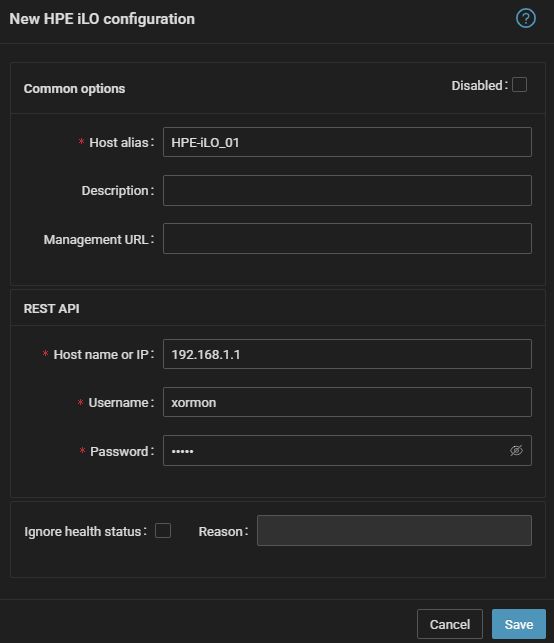
- Transport Layer Security:
XorMon uses TLSv1.2 by default for Service Processors, connection can fail if the target device has stricter security settings.
You can set the protocol version manually in Advanced settings for each device or on the microservice level.
Configure TLS using OpenSSL vendor docu
- Per device setup: UI ➡ Settings ➡ Device ➡ Server SP ➡ [DEVICE] ➡ Advanced settings
- Global setup: UI ➡ Settings ➡ Application ➡ Services ➡ HPE iLO ➡ Advanced settings
Key: tlsVersion
Value: TLSv1.1 or TLSv1.2 or TLSv1.3
- Run "Test" for configured iLO device, it must show "OK"
-
Wait about 1 hour, then reload the web browser, you should see it in XorMon UI