Tape Library
Tape connectivity
-
Allow access from the XorMon host to the Cybernetics ISAN VTL on port 443 (https)
-
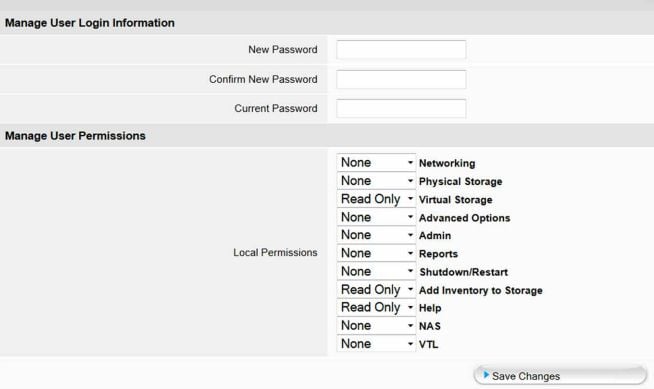
Create user 'xormon' in the tape library and assign him read only rights for:
- Physical Storage
- Virtual Storage
- VTL
Just an example, use above rights:
XorMon configuration
- Add device into configuration from the UI:
Settings icon ➡ Device ➡ Tape ➡ New ➡ Vendor:device ➡ Cybernetics ISAN
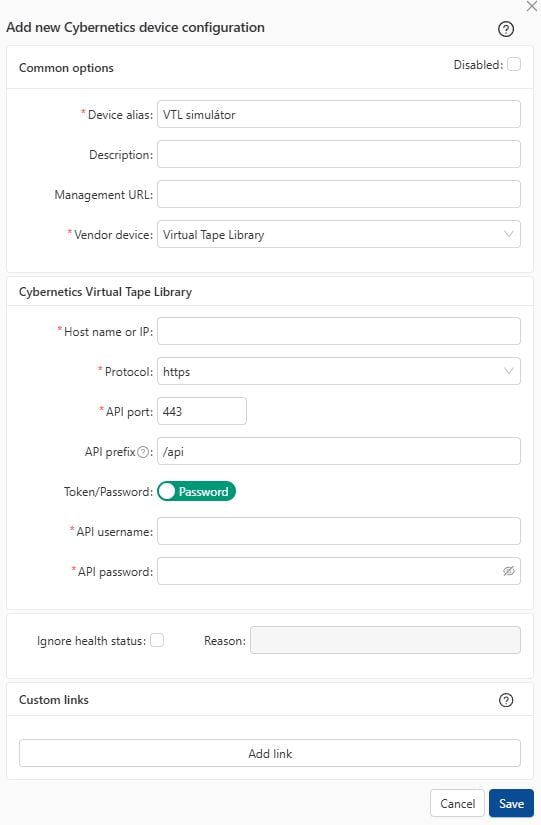
- Run "Test" for configured device, it must show "OK"
-
Wait about 1 hour, then reload the web browser, you should see it in XorMon UI
Overland Storage NEO 200s/400s G2 are IBM TS3100/3200 rebrands
Dell PowerVault TL2000/TL4000 are IBM TS3100/3200 rebrands
Imation LR1200/LR1400 are IBM TS3100/3200 rebrands
IBM TS2k and TS3k tape libraries do not support REST API.
Implementation is done through the SNMP protocol. Tape libraries however providing just limited set of data through that protocol, therefore persented data set is not so rich as for IBM TS4k.
Implementation is done through the SNMP protocol. Tape libraries however providing just limited set of data through that protocol, therefore persented data set is not so rich as for IBM TS4k.
Tape Library configuration
-
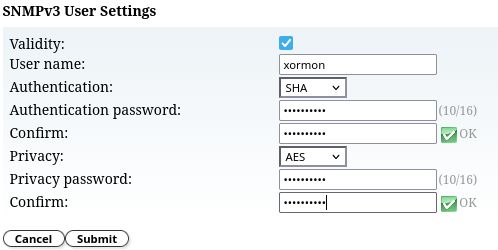
Configure SNMP access
 |
 |
XorMon configuration
- Add tape into configuration from the UI:
Settings icon ➡ Device ➡ Tape ➡ New ➡ Vendor:device ➡ IBM ➡ TS2k TS3k

- Run "Test" for configured tape device, it must show "OK"
-
Wait about 1 hour, then reload the web browser, you should see it in XorMon UI
HPE ESL G3 tape libraries are supported.
Connect them as Quantum Scalar, they are rebrands.
Connect them as Quantum Scalar, they are rebrands.
Fujitsu Storage Scalar tape libraries are supported.
Connect them as Quantum Scalar, they are rebrands.
Connect them as Quantum Scalar, they are rebrands.
Dell EMC² ML3 tape libraries are supported.
Connect them as IBM TS 4300, they are re-brands.
Connect them as IBM TS 4300, they are re-brands.
It gets data via tape library REST API.
Minimal firmware:
Minimal firmware:
- TS4500: 1.10.0.0-F00
- TS4300: 1.4.0.0+
- Diamondback: 2.11.0.0-B00
IBM TS rebrands
- Dell EMC² ML3: it is IBM TS4300, supported
- Imation LR1200/LR1400: it is IBM TS3100/3200, not supported
Tape connectivity
- Allow access from the XorMon host to the tape libraries:
- TS4500: 443 (https)
- TS4300: 3031
- Diamondback: 443 (https)
- Create a new user for XorMon on the library with monitor role
- CLI:
Create user with temporary password.
In case of Diamondback use DiamondbackCLI.jar instead of TS4500CLI.jar in following examples.
java -jar TS4500CLI.jar -ip 9.22.55.88 -u admin -p <admin password> --createUser –name “xormon" –role Monitor –sendToEmail no –tempPass <temp password> -ssl
Note: -ssl … Required if SSL (HTTPS) is enabled.
Run command as xormon user and change temporary password.java -jar TS4500CLI.jar -ip 9.22.55.88 -u xormon -p <temp password> --viewUsers -local -ssl
- Management UI:
- Select Access ➡ Users. The Users page displays.
- Click Create User. The Create User window displays.
- Enter a name for the user and specify a role “Monitor".
- Create the password, uncheck the Send password to this email check box and enter the password in the provided fields.
- Click Create.
- Login again as new user.
- CLI:
- Set SSL on the tape (for TS4500 and Diamondback):

XorMon configuration
- Add tape into configuration from the UI:
Settings icon ➡ Device ➡ Tape ➡ New ➡ Vendor:device ➡ IBM

- Run "Test" for configured storage device, it must show "OK"
-
Wait about 1 hour, then reload the web browser, you should see it in XorMon UI
It gets data via tape library REST API.
Tape connectivity
- Allow access from the XorMon host to the tape library on https (443) port
- Create a new user for XorMon on the library with "user" role
- Log on as an administrator.
- Make sure that you are viewing the physical library. From the View menu, click the name of the physical library.
- Click Setup ➡ User Configuration ➡ Local Users.
- To create a user account, click Create.
- The Local Users - User Account Type dialog box appears.

- In the Enter User Name text box, type a user name.
- In the Enter Password text box, type a password.
- In the Confirm Password text box, type the password again.
- For Select Privilege, select a privilege level User.
- Click Next.
- The Local Users - User Account Type - Assign Partitions dialog box appears.

- Select the Select All check box to give the user access to all listed libraries.
- Click Finish.
XorMon configuration
- Add a tape into configuration from the UI:
Settings icon ➡ Device ➡ Tape ➡ New ➡ Vendor:device ➡ Quantum

- Run "Test" for configured storage device, it must show "OK"
-
Wait about 1 hour, then reload the web browser, you should see it in XorMon UI
Dernière mise à jour :