QNAP monitoring
XorMon, open source under GPL v3, monitors QNAP NAS storage by obtaining all data from QNAP Q'center via SSH, not directly from the QNAP devices. It graphs capacity, IO, data throughput, latency and block size per pool, IO, data, latency and block size per volume, plus RAID group, drive, network port, CPU and memory statistics.
Which QNAP metrics does XorMon monitor?
Per pool, XorMon graphs capacity, IO, data, latency and block size; per volume, IO, data, latency and block size; per RAID group, IO and data; per drive, IO, data and latency.
The QNAP tab of the feature matrix also lists CPU system and memory usage, health status, and performance and hardware event alerting. QNAP NAS is part of the list of supported storage systems on the storage monitoring page.
Sources: Feature matrix, QNAP tab, and Storage monitoring, updated 2026-11-07.
What role does QNAP Q'center play in XorMon monitoring?
XorMon obtains all data from QNAP Q'center via SSH; connecting it directly to QNAP storage devices does not work.
The QNAP Q'center Agent, an app on the QNAP, sends data to QNAP Q'center. If the agent hangs, XorMon stops collecting data from that QNAP.
Sources: installation steps below, updated 2026-11-09.
How does XorMon connect to QNAP Q'center over SSH?
XorMon connects from the XorMon host to the QNAP Q'center appliance over SSH on port 22, with an OS level user without special rights.
The XorMon deployment table lists QNAP with a regular OS user, SSH as the protocol and port 22.
Sources: installation steps below, updated 2026-11-09, and XorMon deployment.
Does XorMon cover QNAP network monitoring?
XorMon graphs the data throughput of each network port of the QNAP NAS; the QNAP tab of the feature matrix lists no other port metric.
Change Tracker records the IP address of the QNAP device. Event alerting sends an alert when a device turns red in the global health status dashboard, and a clear alert when it turns green again.
Sources: Feature matrix, QNAP tab, Change Tracker, updated 2026-10-19, and Alerting, updated 2026-10-13.
Key points
- Monitors QNAP NAS storage through QNAP Q'center, not directly from the QNAP devices.
- SSH on port 22 to Q'center, with an OS level user without special rights.
- Pool: capacity, IO, data, latency and block size; volume: IO, data, latency and block size.
- RAID group, drive and network port statistics, plus CPU system and memory usage.
- Health status, performance and hardware event alerts, open source license (GPL v3).
Installation and configuration for QNAP
The product obtains all data from QNAP Q'center via ssh.Do not connect it directly to QNAP storage devices, that does not work.
Storage connectivity
-
Allow access from the XorMon host to QNAP Q'center on ports 22 (SSH).
-
Connect to the QNAP Q'center as admin and allow ssh access
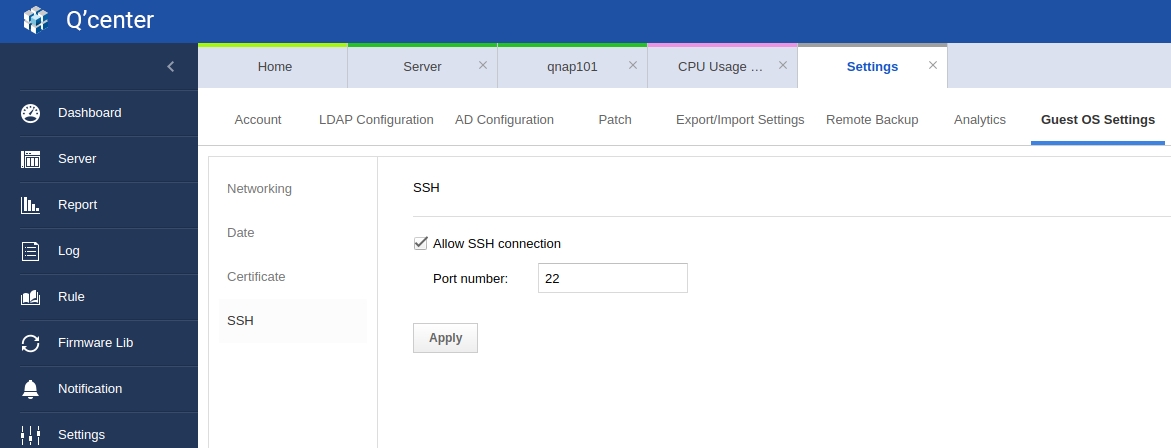
- Create OS level user on the QNAP Q'center appliance, preferably xormon with no any special rights
Log as admin to the QNAP Q'center appliance:admin@qcenter:/home/admin$ sudo useradd -c "XorMon user" -m xormon [sudo] password for admin: admin@qcenter:/home/admin$ sudo passwd xormon Enter new UNIX password: Retype new UNIX password: passwd: password updated successfully
XorMon storage configuration
- Add storage into configuration from the UI:
Settings icon ➡ Storage ➡ New ➡ Vendor:device ➡ QNAP
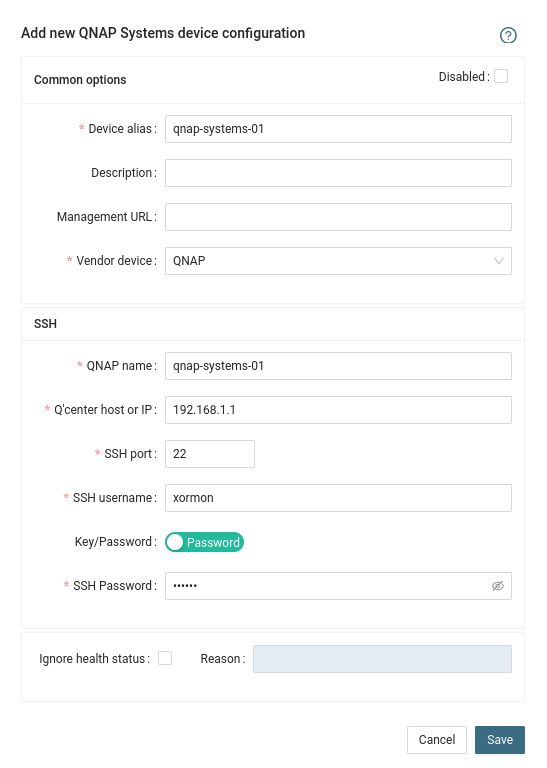
Use 'Server name' from QCENTER as a 'QNAP name' like qnap101 in this example:

- Run "Test" for configured storage device, it must show "OK"
-
Wait about 1 hour, then reload the web browser, you should see it in XorMon UI
Troubleshooting
- XorMon stops collecting data from QNAP
Sometimes QNAP Q'center Agent hangs and stops sending data to QNAP Q'center.
Restart QNAP Q'center agent: Login to QNAP GUI ➡ Open App Center ➡ Stop QNAP Q'center Agent ➡ Start QNAP Q'center Agent
Running arrays from several vendors? XorMon can monitor your storage systems in one place.
Dernière mise à jour :