Everpure (Pure Storage) monitoring
XorMon, open source under GPL v3, monitors Everpure (Pure Storage) FlashArray and FlashBlade arrays through the REST API that the storage provides natively, over HTTPS port 443 with a read-only user. It graphs IO, data throughput, latency and capacity per pool, and also covers volumes, hosts and pods on FlashArray and buckets, NFS, SMB and S3 on FlashBlade.
Which Everpure (Pure Storage) systems does XorMon monitor?
XorMon monitors two Everpure (Pure Storage) families, FlashArray and FlashBlade, each with its own installation tab and its own column in the feature matrix.
The storage monitoring page lists Everpure (Pure Storage) FlashArray and FlashBlade among its other storage vendors. Pure Storage FlashBlade was announced as a newly supported technology in XorMon 1.9.0. LPAR2RRD and STOR2RRD are legacy tools. XorMon is their full-stack successor, and all new development goes into XorMon. STOR2RRD device definitions can be imported into XorMon.
Sources: Storage monitoring, updated 2026-11-02, XorMon 1.9.0, About Xorux, and Migration, updated 2026-07-26.
Which Pure Storage metrics does XorMon collect?
On FlashArray, XorMon graphs IO, data throughput and latency per pool, volume, pod, host and host group. On FlashBlade, it graphs them per pool and bucket, with IO and data for NFS and SMB, and IO and latency for S3.
Both families also have capacity and block size per pool, and FlashBlade has capacity per bucket. Release 2.0.0 added port (Ethernet and FC) statistics, volume groups and protection groups for Pure Storage; releases 2.2.0 and 2.4.0 added FlashArray pod replication metrics and split SAN, service and queue write latency. FlashArray provides real per-host performance statistics, rather than host data aggregated from volumes. FlashArray snapshot monitoring exists but is disabled by default.
Sources: Feature matrix, Everpure (Pure Storage) tab, Host data, updated 2026-05-04, Storage snapshot, updated 2026-10-19, and release notes 2.0, 2.2 and 2.4.
How does XorMon connect to Everpure (Pure Storage) arrays?
XorMon reads the data through the REST API of the storage, from the XorMon host to the array on port 443 (HTTPS), with a xormon user in the read-only group.
On FlashArray, new users cannot be created on the storage: the xormon user is created in Active Directory and mapped to the read-only group; the local pureuser also works, but it has admin rights. Since release 2.2.30, FlashArray also supports API token login authentication. On FlashBlade, an API token is generated in the Purity UI or with the pureadmin create --api-token command, without an expiration period. The array is then added in the XorMon UI under Settings, Storage, New, and the Test must show OK.
Sources: installation tabs below, updated 2026-11-02, XorMon deployment, and release notes 2.2.
How does XorMon alert on Pure Storage problems and keep the history?
The feature matrix marks health status, performance alerting and hardware event alerting for FlashArray and FlashBlade, and XorMon keeps storage data for up to 3 years.
A storage alert group selects volumes by regex, a metric such as latency and a threshold. Event alerting sends an alert when a device turns red in the global health status dashboard, and a clear alert when it turns green again. FlashArray copy services are monitored too, with alerts when anything goes wrong. Storage data is kept from 5 minute averages for 3 months up to daily averages for 3 years.
Sources: Alerting and Copy Services monitoring, both updated 2026-10-13, Data retention, updated 2026-05-04, and Feature matrix.
Key points
- Monitors Everpure (Pure Storage) FlashArray and FlashBlade through the native REST API on port 443.
- FlashArray: IO, data throughput and latency per pool, volume, pod, host and host group.
- FlashBlade: pools and buckets, plus NFS, SMB and S3.
- Read-only xormon user; API token on FlashBlade, and on FlashArray since release 2.2.30.
- Health status, performance and event alerts, free open source license (GPL v3).
Installation and configuration for FlashArray and FlashBlade
Storage connectivity
-
Allow access from the XorMon host to the Pure Storage FlashBlade storage on port 443 (https).
-
Create user xormon on the storage in read-only group .
-
Generate an API Token on the storage:
Generate an API token through the Purity UI (System > Users > Create API Token) or through the CLI :pureadmin create --api-token T-e7e551be-fe5d-4669-baf5-670cd8ea0560
Do not set an expiration period when creating API token!
Use the key in storage configuration below.
XorMon storage configuration
- Add storage into configuration from the UI:
Settings icon ➡ Storage ➡ New ➡ Vendor:device ➡ Pure Storage FlashBlade
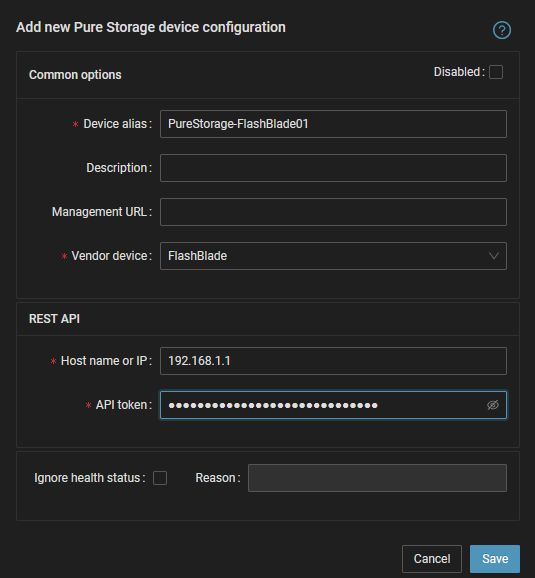
- Run "Test" for configured storage device, it must show "OK"
-
Wait about 1 hour, then reload the web browser, you should see it in XorMon UI
Storage connectivity
-
Allow access from the XorMon host to the Pure Storage FlashArray storage on port 443 (https).
-
Create user xormon on the storage in read-only group .
You have to create xormon user in Active Directory as there cannot be created new users on the storage and then map it to read-only group on the storage.
You might even use pureuser which is available on the storage locally, but it has admin rights.
Integrating Active Directory with the Pure Storage FlashArray.
XorMon storage configuration
- Add storage into configuration from the UI:
Settings icon ➡ Storage ➡ New ➡ Vendor:device ➡ Pure Storage FlashArray
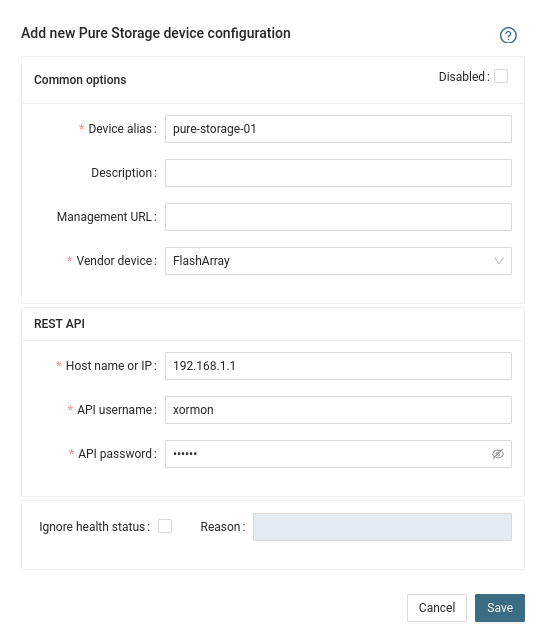
- Run "Test" for configured storage device, it must show "OK"
-
Wait about 1 hour, then reload the web browser, you should see it in XorMon UI
Dernière mise à jour :