Database
XorMon uses native MongoDB driver in Node.JS to connect the database.
Create an user
- Create a role under use admin
db.createRole({ role: "XorMon", privileges: [ { resource: { cluster: true }, actions: [ "serverStatus", "hostInfo", "top" ] }, { resource: { db: "", collection: "" }, actions: [ "dbStats" ] }, { resource: { db: "", collection: "" }, actions: [ "collStats" ] } ], roles: [ { role: "readAnyDatabase", db: "admin" } ] }) - create 'xomron' user
db.createUser({
  user: "xormon",
  pwd: passwordPrompt(),
  roles: [ { role: "XorMon", db: "admin" } ]
})
Attach MongoDB instance
-
XorMon UI ➡ Device ➡ Database ➡MongoDB ➡ New :
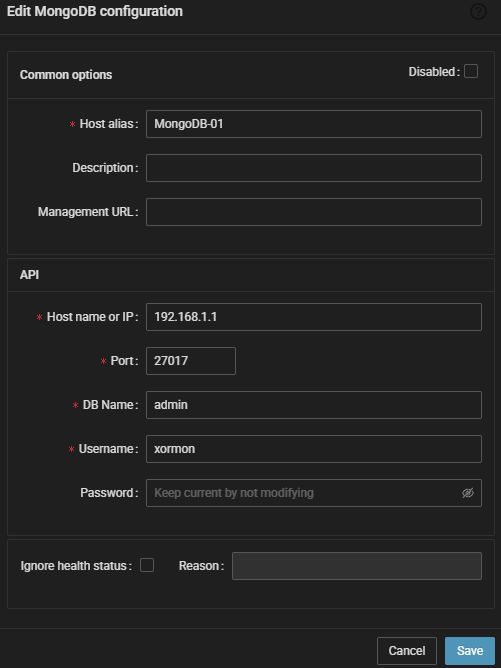
- Run "Test" for configured MongoDB database, it must show "OK"
-
Wait about 1 hour, then refresh the web browser cache by Ctrl-F5
Data is obtained via ODBC.
Prerequisites
-
Add this line to pg_hba.conf on PostgreSQL host:
host all xormon monitoring machine IP/hostname md5
Running this command on your DB can help you locate pg_hba.confSHOW hba_file;
After you complete this step restart the PostgresSQL service
-
Make sure you have installed perl modules: perl-DBI and perl-DBD-Pg on XorMon server
Skip it in case of XorMon Virtual Appliance or Docker deploymentInstall them if they are missing under root user$ rpm -q perl-DBI perl-DBD-Pg perl-DBI-1.627-4.el7.x86_64 perl-DBD-Pg-2.19.3-4.el7.x86_64
- Linux RedHat, CentOS
# yum install perl-DBD-Pg
- Linux Debian, Ubuntu
# apt-get install libdbd-pg-perl
- Linux RedHat, CentOS
Connectivity check
-
Allow access from the XorMon host to PostgreSQL host on port 5432
Create DB user
-
Create database user ("xormon" in this example) with these privileges on each database on host machine.
CREATE ROLE xormon WITH PASSWORD 'your_passw0rd' LOGIN;
GRANT SELECT ON TABLE pg_stat_bgwriter TO xormon;
GRANT SELECT ON TABLE pg_stat_database TO xormon;
GRANT SELECT ON TABLE pg_stat_activity TO xormon;
GRANT SELECT ON TABLE pg_locks TO xormon;
GRANT SELECT ON TABLE pg_cursors TO xormon;
GRANT SELECT ON TABLE pg_stat_progress_vacuum TO xormon;
GRANT SELECT ON TABLE pg_stat_replication TO xormon;
GRANT SELECT ON TABLE pg_stat_wal_receiver TO xormon;
Attach PostgreSQL
-
As PostgreSQL gives us info about every DB on host machine we suggest that you use the machine hostname as "Host alias" and choose one DB for initial connect.
XorMon UI ➡ Device ➡ Database ➡PostgreSQL DB ➡ New :
In case of error: SCRAM authentication requires libpq version 10 or above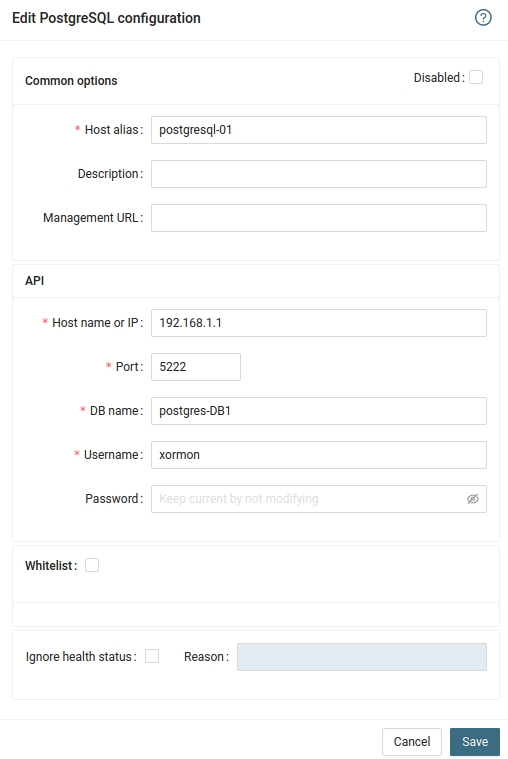
Either upgrade libpq to version 10+ or change users password authentication to md5 and generate new password
- Run "Test" for configured PostgreSQL database, it must show "OK"
-
Wait about 1 hour, then refresh the web browser cache by Ctrl-F5
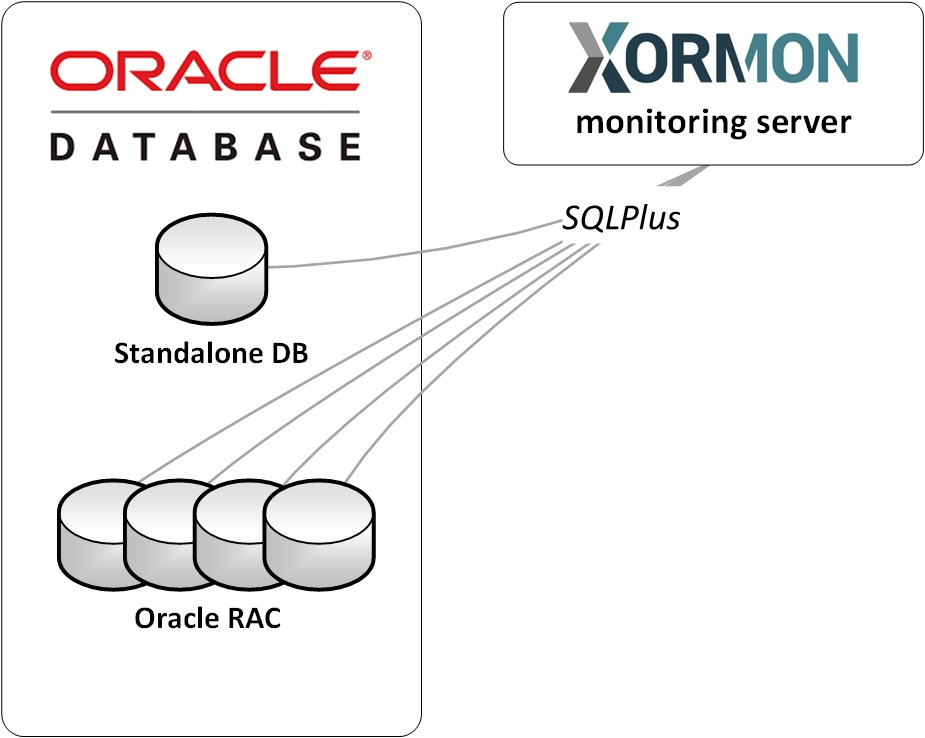 |
Monitoring implementation does not require any Oracle licensed features like Oracle Diagnostics Pack or Oracle Tuning Pack .
Monitoring requires a database user with the following view only permissions to collect monitoring data:
- create session
- select rights on specific sys.* tables
Oracle Instant Client and SQL*Plus installation
Oracle Instant Client and SQL Plus are used for collecting information from an Oracle DB instance.Oracle DB user is needed with sufficient privileges.
Version compatibility
OIC 19c supports Oracle DB versions 11.2.0.4 and newer.
If you are using previously installed SQL Plus, make sure it is version 12.2 and above.
Oracle Instant Client (OIC) can be deployed from a ZIP file or installed as an RPM package.
Installation steps are performed under root account
- Linux: libaio prerequisite (skip in case of XorMon Virtual Appliance or Docker deployment)
- RHEL / Rocky Linux
dnf install libaio.x86_64
- Debian
apt install libaio1
- Debian 13 / Ubuntu 24+
Package libaio1 has been replaced with libaio1t64 in Debian 13 and Ubuntu 24+
Oracle must recompile SQLPLUS by updating its dependencies to libaio1t64.
Currently, for it to work, it is necessary to create a symbolic link from libaio1t64 to libaio1
ln -s /usr/lib/x86_64-linux-gnu/libaio.so.1t64 /usr/lib/x86_64-linux-gnu/libaio.so.1
- RHEL / Rocky Linux
- RHEL / CentOS / Rocky Linux
dnf install libnsl.x86_64
- Installation from ZIP files
- AIX: note that Oracle Client package don't work on AIX 6.1, only AIX 7.1 and newer
- Download ZIP packages from Oracle Download website Linux x86-64, AIX
OIC basic: instantclient-basic-linux.x64-19.6.0.0.0dbru.zip
SQL*Plus: instantclient-sqlplus-linux.x64-19.6.0.0.0dbru.zip
Create /opt/oracle directory and unzipumask 022 mkdir /opt/oracle cd /opt/oracle unzip /<download_dir>/instantclient-basic-linux.x64-19.6.0.0.0dbru.zip unzip /<download_dir>/instantclient-sqlplus-linux.x64-19.6.0.0.0dbru.zip
ZIP files will be unpacked into /opt/oracle/instantclient_<version>
- ldconfig
echo "/opt/oracle/instantclient_<version>" > /etc/ld.so.conf.d/oracle-instantclient.conf
ldconfig
- AIX: note that Oracle Client package don't work on AIX 6.1, only AIX 7.1 and newer
- RPM installation
- Download RPM packages from Oracle Download site:Linux x86-64
OIC basic: oracle-instantclient19.6-basic-19.6.0.0.0-1.x86_64.rpm
SQL*Plus: oracle-instantclient19.6-sqlplus-19.6.0.0.0-1.x86_64.rpm
or directly using wget:wget https://download.oracle.com/otn_software/linux/instantclient/19600/oracle-instantclient19.6-basic-19.6.0.0.0-1.x86_64.rpm wget https://download.oracle.com/otn_software/linux/instantclient/19600/oracle-instantclient19.6-sqlplus-19.6.0.0.0-1.x86_64.rpm - RHEL / Rocky Linux
dnf install oracle-instantclient19.6-basic-19.6.0.0.0-1.x86_64.rpm oracle-instantclient19.6-sqlplus-19.6.0.0.0-1.x86_64.rpm
- Debian / Ubuntu: use "alien" converter
apt update
apt install alien
alien --to-deb --scripts oracle-instantclient19.6-basic-19.6.0.0.0-1.x86_64.rpm
alien --to-deb --scripts oracle-instantclient19.6-sqlplus-19.6.0.0.0-1.x86_64.rpm
apt install libaio1  # Oracle client prerequisite
apt install ./oracle-instantclient19.6-basic_19.6.0.0.0-2_amd64.deb ./oracle-instantclient19.6-sqlplus_19.6.0.0.0-2_amd64.deb
apt list --installed | grep oracle
oracle-instantclient19.6-basic/now 19.6.0.0.0-2 amd64 [installed,local]
oracle-instantclient19.6-sqlplus/now 19.6.0.0.0-2 amd64 [installed,local]
ls -l /usr/lib/oracle/19.6/client64/bin/sqlplus
-rwxr-xr-x 1 root root 24472 Dec 17  2019 /usr/lib/oracle/19.6/client64/bin/sqlplus
- Download RPM packages from Oracle Download site:Linux x86-64
Create DB user
Database user in each Oracle instance must be created, it will be used for monitoring access.You can choice whatever user name (below examle show "xormon" user, then specify it in XorMon Database properties.
- Standalone / RAC
$ sqlplus sys"/as sysdba"
create user xormon_check identified by "<password>" default tablespace USERS temporary tablespace TEMP;
grant create session to xormon_check;
grant select on sys.v_$instance_ping to xormon_check;
grant select on sys.v_$resource_limit to xormon_check;
grant select on sys.gv_$resource_limit to xormon_check;
grant select on sys.v_$sysmetric_summary to xormon_check;
grant select on sys.gv_$sysmetric_summary to xormon_check;
grant select on sys.v_$sysmetric_history to xormon_check;
grant select on sys.gv_$sysmetric_history to xormon_check;
grant select on sys.v_$datafile to xormon_check;
grant select on sys.gv_$datafile to xormon_check;
grant select on sys.v_$filestat to xormon_check;
grant select on sys.gv_$filestat to xormon_check;
grant select on sys.v_$instance to xormon_check;
grant select on sys.gv_$instance to xormon_check;
grant select on sys.v_$database to xormon_check;
grant select on sys.gv_$database to xormon_check;
grant select on sys.v_$osstat to xormon_check;
grant select on sys.gv_$osstat to xormon_check;
grant select on sys.v_$session to xormon_check;
grant select on sys.gv_$session to xormon_check;
grant select on sys.v_$sgainfo to xormon_check;
grant select on sys.gv_$sgainfo to xormon_check;
grant select on sys.v_$containers to xormon_check;
grant select on sys.gv_$containers to xormon_check;
grant select on sys.v_$pgastat to xormon_check;
grant select on sys.gv_$pgastat to xormon_check;
grant select on sys.v_$system_wait_class to xormon_check;
grant select on sys.gv_$system_wait_class to xormon_check;
grant select on sys.v_$system_event  to xormon_check;
grant select on sys.gv_$system_event  to xormon_check;
grant select on sys.v_$cluster_interconnects  to xormon_check;
grant select on sys.gv_$cluster_interconnects to xormon_check;
grant select on sys.v_$sysstat to xormon_check;
grant select on sys.gv_$sysstat to xormon_check;
grant select on sys.v_$service_stats to xormon_check;
grant select on sys.gv_$service_stats to xormon_check;
grant select on sys.v_$event_histogram to xormon_check;
grant select on sys.gv_$event_histogram to xormon_check;
grant select on dba_free_space to xormon_check;
grant select on dba_temp_free_space to xormon_check;
grant select on dba_data_files to xormon_check;
grant select on dba_registry to xormon_check;
grant select on dba_temp_files to xormon_check;
grant select on sys.registry$history to xormon_check;
grant select on sys.REGISTRY$SQLPATCH to xormon_check;
grant select on sys.v_$recovery_file_dest to xormon_check;
grant select on sys.v_$log to xormon_check;
grant select on sys.v_$controlfile to xormon_check;
grant select on dba_alert_history_detail to xormon_check;
grant select on sys.v_$logfile to xormon_check;
exit;
Additional rights required since XorMon v2.4.0 due to huge scope increase:$ sqlplus sys"/as sysdba" grant create session to xormon_check; grant select on sys.gv_$active_services to xormon_check; grant select on sys.gv_$transaction to xormon_check; grant select on sys.v_$sqlarea to xormon_check; grant select on sys.gv_$sqlarea to xormon_check; grant select on sys.gv_$sqlstats to xormon_check; grant select on sys.v_$asm_diskgroup_stat to xormon_check; grant select on sys.gv_$asm_diskgroup_stat to xormon_check; grant select on sys.gv_$asm_disk_stat to xormon_check; exit;
- Multitenant
$ sqlplus sys"/as sysdba"
create user xormon_check identified by "<password>" default tablespace USERS temporary tablespace TEMP CONTAINER = ALL;
grant create session to xormon_check CONTAINER = ALL;
grant SET CONTAINER to xormon_check CONTAINER = ALL;
grant select on sys.v_$instance_ping to xormon_check CONTAINER = ALL;
grant select on sys.v_$resource_limit to xormon_check CONTAINER = ALL;
grant select on sys.gv_$resource_limit to xormon_check CONTAINER = ALL;
grant select on sys.v_$sysmetric_summary to xormon_check CONTAINER = ALL;
grant select on sys.gv_$sysmetric_summary to xormon_check CONTAINER = ALL;
grant select on sys.v_$sysmetric_history to xormon_check CONTAINER = ALL;
grant select on sys.gv_$sysmetric_history to xormon_check CONTAINER = ALL;
grant select on sys.v_$datafile to xormon_check CONTAINER = ALL;
grant select on sys.gv_$datafile to xormon_check CONTAINER = ALL;
grant select on sys.v_$filestat to xormon_check CONTAINER = ALL;
grant select on sys.gv_$filestat to xormon_check CONTAINER = ALL;
grant select on sys.v_$instance to xormon_check CONTAINER = ALL;
grant select on sys.gv_$instance to xormon_check CONTAINER = ALL;
grant select on sys.v_$database to xormon_check CONTAINER = ALL;
grant select on sys.gv_$database to xormon_check CONTAINER = ALL;
grant select on sys.v_$osstat to xormon_check CONTAINER = ALL;
grant select on sys.gv_$osstat to xormon_check CONTAINER = ALL;
grant select on sys.v_$session to xormon_check CONTAINER = ALL;
grant select on sys.gv_$session to xormon_check CONTAINER = ALL;
grant select on sys.v_$sgainfo to xormon_check CONTAINER = ALL;
grant select on sys.gv_$sgainfo to xormon_check CONTAINER = ALL;
grant select on sys.v_$containers to xormon_check CONTAINER = ALL;
grant select on sys.gv_$containers to xormon_check CONTAINER = ALL;
grant select on sys.v_$pgastat to xormon_check CONTAINER = ALL;
grant select on sys.gv_$pgastat to xormon_check CONTAINER = ALL;
grant select on sys.v_$system_wait_class to xormon_check CONTAINER = ALL;
grant select on sys.gv_$system_wait_class to xormon_check CONTAINER = ALL;
grant select on sys.v_$system_event  to xormon_check CONTAINER = ALL;
grant select on sys.gv_$system_event  to xormon_check CONTAINER = ALL;
grant select on sys.v_$con_sysmetric_summary  to xormon_check CONTAINER = ALL;
grant select on sys.gv_$con_sysmetric_summary  to xormon_check CONTAINER = ALL;
grant select on sys.v_$con_sysmetric_history   to xormon_check CONTAINER = ALL;
grant select on sys.gv_$con_sysmetric_history  to xormon_check CONTAINER = ALL;
grant select on sys.v_$cluster_interconnects  to xormon_check CONTAINER = ALL;
grant select on sys.gv_$cluster_interconnects to xormon_check CONTAINER = ALL;
grant select on sys.v_$sysstat to xormon_check CONTAINER = ALL;
grant select on sys.gv_$sysstat to xormon_check CONTAINER = ALL;
grant select on sys.v_$service_stats to xormon_check CONTAINER = ALL;
grant select on sys.gv_$service_stats to xormon_check CONTAINER = ALL;
grant select on sys.v_$event_histogram to xormon_check CONTAINER = ALL;
grant select on sys.gv_$event_histogram to xormon_check CONTAINER = ALL;
grant select on dba_free_space to xormon_check CONTAINER = ALL;
grant select on dba_temp_free_space to xormon_check CONTAINER = ALL;
grant select on dba_data_files to xormon_check CONTAINER = ALL;
grant select on dba_registry to xormon_check CONTAINER = ALL;
grant select on dba_temp_files to xormon_check CONTAINER = ALL;
grant select on sys.registry$history to xormon_check CONTAINER = ALL;
grant select on sys.REGISTRY$SQLPATCH to xormon_check CONTAINER = ALL;
grant select on sys.v_$recovery_file_dest to xormon_check CONTAINER = ALL;
grant select on sys.v_$log to xormon_check CONTAINER = ALL;
grant select on sys.v_$controlfile to xormon_check CONTAINER = ALL;
grant select on dba_alert_history_detail to xormon_check CONTAINER = ALL;
grant select on sys.v_$logfile to xormon_check CONTAINER = ALL;
exit;
Additional rights required since XorMon v2.4.0 due to huge scope increase:$ sqlplus sys"/as sysdba" grant create session to xormon_check; grant select on sys.gv_$active_services to xormon_check CONTAINER = ALL; grant select on sys.gv_$transaction to xormon_check CONTAINER = ALL; grant select on sys.v_$sqlarea to xormon_check CONTAINER = ALL; grant select on sys.gv_$sqlarea to xormon_check CONTAINER = ALL; grant select on sys.gv_$sqlstats to xormon_check CONTAINER = ALL; grant select on sys.v_$asm_diskgroup_stat to xormon_check CONTAINER = ALL; grant select on sys.gv_$asm_diskgroup_stat to xormon_check CONTAINER = ALL;; grant select on sys.gv_$asm_disk_stat to xormon_check CONTAINER = ALL;; exit;
- DataGuard: Standalone/RAC
Enhance user priviledges on primary database. DG instance does not need xormon user.grant select on sys.v_$dataguard_config to xormon_check; grant select on sys.v_$ARCHIVE_DEST to xormon_check; grant select on sys.v_$archive_dest_status to xormon_check;
Additional rights required since XorMon v2.4.0 due to huge scope increase:$ sqlplus sys"/as sysdba" grant create session to xormon_check; grant select on sys.v_$archived_log to xormon_check; exit;
- DataGuard: Multitenant/RAC Multitenant
Enhance user priviledges on primary database. DG instance does not need xormon user.grant select on sys.v_$dataguard_config to xormon_check CONTAINER = ALL; grant select on sys.v_$ARCHIVE_DEST to xormon_check CONTAINER = ALL; grant select on sys.v_$archive_dest_status to xormon_check CONTAINER = ALL;
Additional rights required since XorMon v2.4.0 due to huge scope increase:$ sqlplus sys"/as sysdba" grant create session to xormon_check; grant select on sys.v_$archived_log to xormon_check; exit;
- Note that for older databases than 12c you get errors like this, ignore them (you do not get this data from database: PSU,patches info)
SQL> grant SET CONTAINER to xormon;
ORA-00990: missing or invalid privilege
SQL> grant select on sys.REGISTRY$SQLPATCH to xormon;
ORA-00942: the table does not exist
Connectivity check
Allow access from the XorMon host to Oracle DB host.Make sure you are using correct port.
Default port for Oracle DB sessions is 1521.
ORACLE_HOME
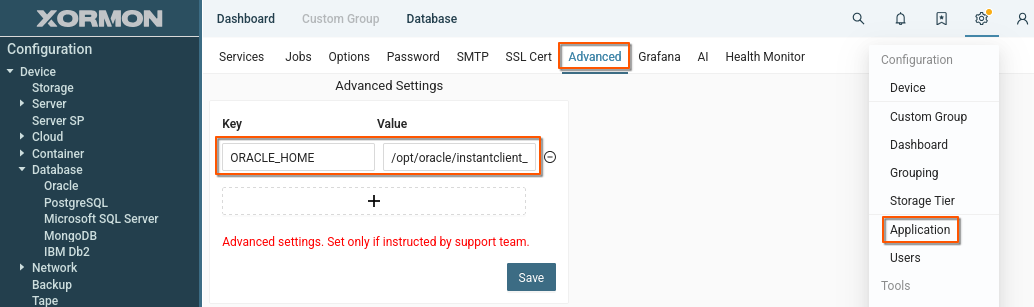
ORACLE_HOME sets the path to binary files for Oracle client and SQLplus.You can set ORACLE_HOME separately for each database, see "Attach Oracle Database" below.
Or you can set ORACLE_HOME globally in Settings -> Application -> Advanced
Create a new Key/Value pair where the key will be 'ORACLE_HOME' and the value will contain the path.
 |
Attach Oracle Databases
-
XorMon UI ➡ Device ➡ Database ➡ Oracle DB ➡ New :
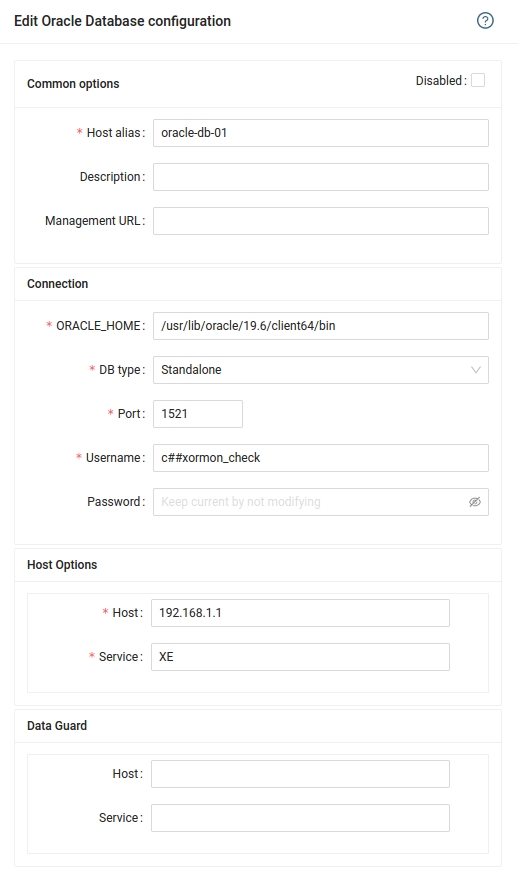
Oracle service: to list Oracle service use this cmd on the server where DB is running: lsnrctl status
Oracle RAC: Do not use SCAN IP in the configuration, add Virtual IP for each RAC node/instance separately. These instances should use the same listener service
Make sure that connection test passes without errors or warnings.
-
Number of attached Oracle RAC instances is limited to 1 in the Free edition.
However you can attach Oracle RAC nodes even as stand-alone instances if you reach the limitation, there is no limit for attaching of Oracle stand-alone DB instances.
- Run "Test" for configured database, it must show "OK"
-
Wait about 1 hour, then refresh the web browser cache by Ctrl-F5
Data is obtained via ODBC.
Prerequisites
-
Install one of the supported ODBC drivers for SQL Server:
- Microsoft ODBC driver for SQL Server (Linux)
docs.microsoft.com/en-us/sql/connect/odbc/linux-mac/installing-the-microsoft-odbc-driver-for-sql-server
- unixODBC + FreeTDS
unixodbc.org
freetds.org
Debian / Ubuntu
apt install unixodbc unixodbc-dev tdsodbc
RHEL / Rocky Linux
dnf install perl-DBD-ODBC unixODBC unixODBC-devel freetds
openSUSE
zypper install freetds-config
Note: Make sure the driver path is present in "/etc/odbcinst.ini" (Most installations will do this automatically)$ cat /etc/odbcinst.ini # Driver from the freetds-libs package # Setup from the unixODBC package [FreeTDS] Description = Free Sybase & MS SQL Driver Driver = /usr/lib/libtdsodbc.so Setup = /usr/lib/libtdsS.so
- Microsoft ODBC driver for SQL Server (Linux)
- Make sure necessary Perl modules are installed on XorMon server
Debian / Ubuntu
apt list --installed libdbi-perl libdbd-odbc-perl

Listing... Done
libdbd-odbc-perl/oldstable,now 1.61-2+b2 amd64 [installed]
libdbi-perl/oldstable,now 1.643-4 amd64 [installed]
Install if necessary
apt install libdbi-perl libdbd-odbc-perl
Debian 13
There is no 'libdbd-odbc-perl' package available for Debian 13
Perl module 'DBD::ODBC' has to be installed using CPAN
perl -MCPAN -e'shell'

cpan[1]> install DBD::ODBC
RHEL / Rocky Linux
rpm -q perl-DBI perl-DBD-ODBC

perl-DBI-1.627-4.el7.x86_64
perl-DBD-ODBC-1.50-3.el7.x86_64
Install if necessary
dnf install perl-DBD-ODBC
Connectivity check
-
Allow access from the XorMon host to SQL Server host.
Make sure you are using correct port. Default port for SQL server sessions is 1433.
Create DB user
-
Create database user with these privileges on each database on host machine.
CREATE LOGIN xormon WITH PASSWORD = 'your_passw0rd';
CREATE USER xormon FOR LOGIN xormon;
GRANT CONNECT ANY DATABASE TO xormon;
USE master;
GRANT VIEW SERVER STATE TO xormon;
Attach Microsoft SQL Server
-
As SQL Server gives us info about every DB on host machine we suggest that you use the machine hostname as "Host alias" and choose one DB for initial connect.
XorMon UI ➡ Device ➡ Database ➡ Microsoft SQL Server ➡ New :
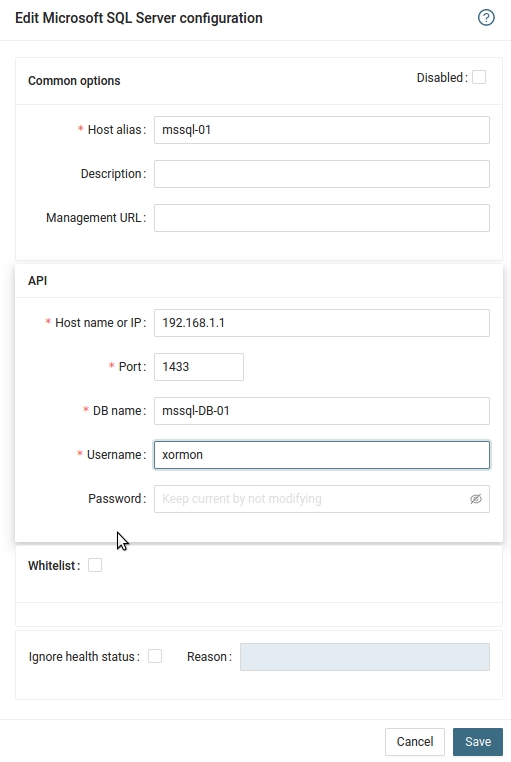
Use <servername>\<instancename> in the Host field if you have Named Instances like in this example:
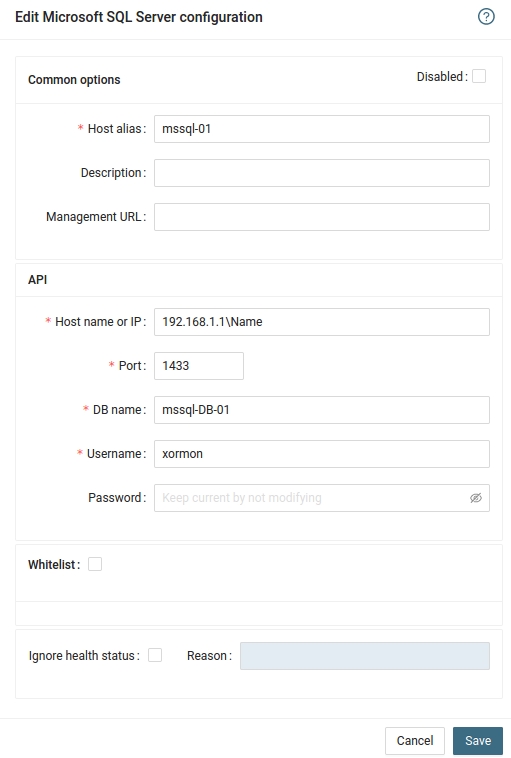
- Run "Test" for configured database, it must show "OK"
-
Wait about 1 hour, then refresh the web browser cache by Ctrl-F5
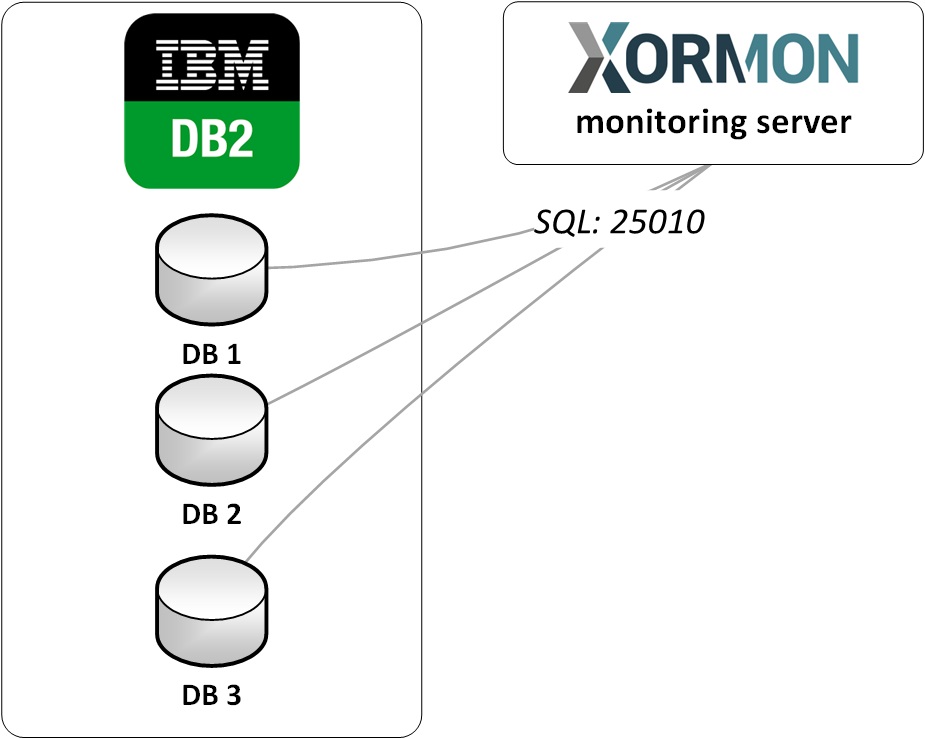 |
It gets data using Perl module DBD::DB2
Prerequisites
Skip this in case you are on the XorMon Virtual Appliance-
Install Perl DBI and DBD::DB2 modules as per www.ibm.com/support/pages/db2-perl-database-interface-luw
Get from above page driver package of requested version (like ibm_data_server_driver_package_linuxx64_v11.5.tar.gz) and put it into /tmp
# under root

umask 022
cd /tmp
tar xvfz /tmp/ibm_data_server_driver_package_linuxx64_v11.5.tar.gz
cd /tmp/dsdriver
./installDSDriver
. ./db2profile
export DB2_HOME=/tmp/dsdriver
export DB2LIB=/tmp/dsdriver/lib
cpanm DBD::DB2

# copy DB2 libraries to /usr/local/lib
cp -r /tmp/dsdriver/lib/* /usr/local/lib/

# and index them for usage
ldconfig /usr/local/lib

# test Perl DBD::DB2 module (there should be no errors)
perl -MDBD::DB2 -le 'print $DBD::DB2::VERSION'

rm -rf /tmp/dsdriver /tmp/ibm_data_server_driver_package_linuxx64_v11.5.tar.gz
Create DB user
Create a database user with these privileges on each database on the host machine.- Create system user xormon if there isn't one:
www.ibm.com/docs/en/db2/11.1?topic=unix-creating-group-user-ids-db2-database-installation
- Grant privileges to the user in the database.
GRANT createtab,bindadd,connect ON DATABASE TO USER xormon;
GRANT EXECUTE ON FUNCTION  SYSPROC.* TO USER xormon;
GRANT EXECUTE ON PROCEDURE SYSPROC.* TO USER xormon;
GRANT SELECT ON TABLE SYSIBMADM.DB2_MEMBER TO USER xormon;
CREATE SCHEMA xormon;
Attach IBM Db2 to XorMon
- Add each database through the UI
XorMon UI ➡ Device ➡ Database ➡ IBM Db2 ➡ New :
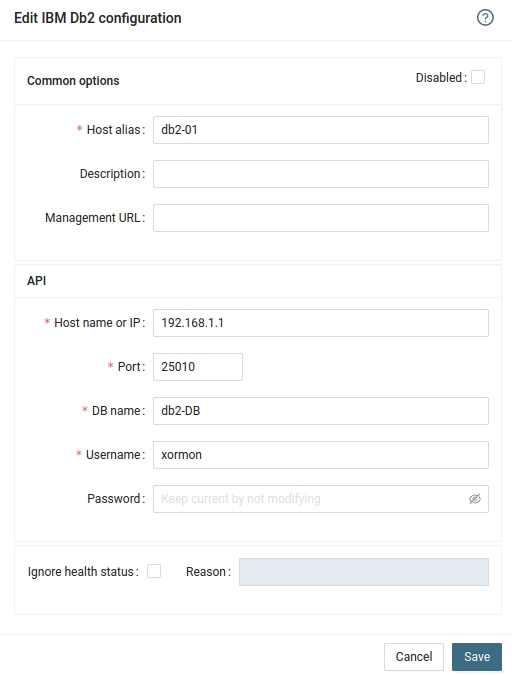
- Run "Test" for configured database, it must show "OK"
-
Wait about 1 hour, then refresh the web browser cache by Ctrl-F5